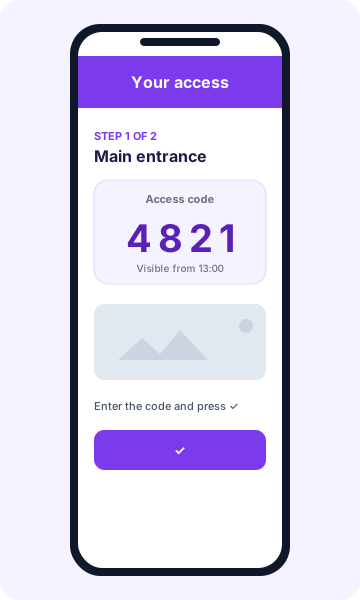
The access guide is the page the guest sees to enter the property: instructions, photos and the code for each door. It is the same for smart locks (Nuki, Yacan, Akiles) and for manual accesses such as key boxes.
What you configure
For each door or lock:
- Access name (for example, “Entrance” or “Apartment door”).
- Arrival instructions: where it is, how it opens, what to do if it fails.
- Fixed code, for manual accesses only.
- Step-by-step photos: up to 5 per step (JPG, PNG or WebP, 10 MB maximum each).
- Tutorial video with a YouTube link (video, Shorts or youtu.be).
Write in your language: the platform detects it and translates it automatically into English, German, French, Italian and other languages. A live preview shows what the guest will see.
Key boxes and manual accesses
For MasterLock, dial key boxes, gates or any access with a fixed code:
- Integrations → Locks → Add lock → Manual / Key box.
- Choose the property.
- Enter the name, where the key box is and its fixed code.
- Add instructions, photos and video.
The fixed code is only shown to the guest within their access window and with registration complete, just like automatic PINs. Since the code does not change, remember to update it on the key box from time to time.
Several accesses in order
If the guest passes through several doors, drag to order them (for example: entrance → apartment → key box). The guide shows one step per door, with its code and photos, mixing smart and manual accesses.
When the guide is sent
| Option | Sending time |
|---|---|
| Immediate | 15 minutes after the guest completes registration (default) |
| 24 hours before | 24 h before check-in |
| 48 hours before | 48 h before check-in |
| Check-in day | At 07:00 on arrival day |
Scheduled options are never sent before registration is complete. You can send it by email and, if you use Hospitable or OwnerRez, also through the booking chat with a customizable message (up to 1,000 characters; the {enlace} placeholder is replaced with the guide link). At least one channel must be active.
When the guest sees the codes
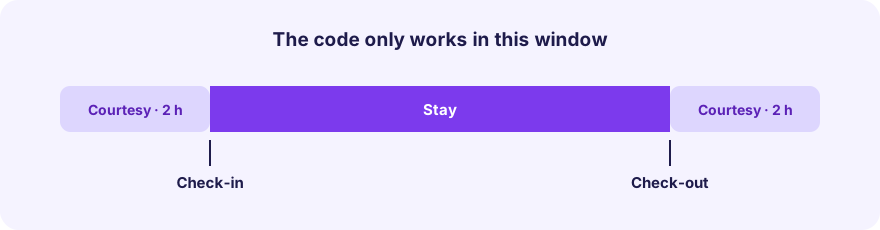
- Registration must be complete: form done and all expected guests registered. If you prefer otherwise, you can disable this block.
- The access window must have started: check-in time minus entry courtesy, until check-out time plus exit courtesy.
- If you have several accesses, the full guide only opens when all are ready, so a partial guide is never shown.
Optionally you can show the guide inside the guest’s own form, which they can consult from their link when the access window starts.
Security
- The email only contains a signed link with an expiry; codes do not travel in the email.
- Each booking’s link only opens that booking’s guide.
- The guest needs no app or account.
Checklist before your first arrival
- Lock connected and assigned to the property.
- Check-in/check-out times and courtesies correct.
- Instructions with photos and, if helpful, video.
- Order of accesses reviewed.
- Sending time and channel chosen.
- Test the link of a test booking from your phone.