Registro Parte Viajeros connects your smart locks to traveler registration so that each guest receives their access only after completing the registration form, with no need for you to create codes, send messages or be present at arrival.
This guide explains the general behavior. To connect each brand, follow its own guide:
Supported locks
These are the most common brands with a direct integration, but many more locks are compatible: Nuki, Tedee, Yacan and Akiles are just a few examples.
| Access type | What the guest receives | Created automatically |
|---|---|---|
| Nuki Smart Lock with Keypad | Temporary PIN (customizable: you can also choose app opening) | Yes |
| Nuki Smart Lock without Keypad | Nuki app invitation link to open the door, sent automatically to their email and valid only during the stay | Yes |
| Nuki Opener (building entrance or intercom) | Instructions in the guide, no PIN | Needs no access of its own |
| Tedee | Temporary PIN (with Keypad) or temporary phone access (without Keypad) | Yes |
| Yacan | Temporary PIN and eKey (button to open with the phone) | Yes |
| Akiles | Temporary PIN and eKey (phone opening link), valid on every door in the group | Yes |
| KeyNest | Key collection code valid only during the stay, with the KeyNest point | Yes |
| Key box or manual lock (MasterLock, gates…) | Fixed code and a guide with photos and video | No, you set it up once |
You can combine several accesses in one property (for example, a Nuki Opener at the entrance, a Yacan lock on the apartment door and a key box) and order them the way the guest will pass through them.
How it works, step by step
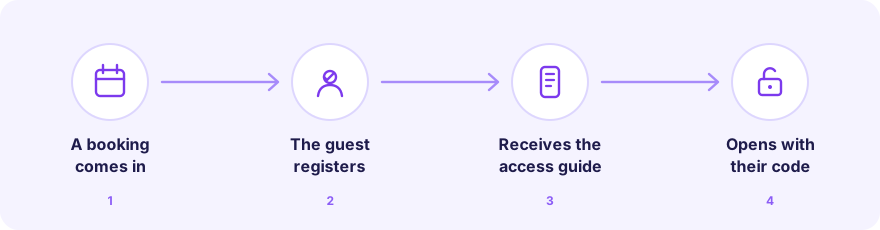
- You connect your lock from Integrations → Locks and assign it to a property.
- You set the schedule: check-in time, check-out time and the courtesy hours before entry and after departure.
- A booking comes in (via calendar, PMS or manually). The platform automatically prepares the PIN or invitation for that stay.
- The guest completes the registration: details, ID document and signature.
- They receive the access guide by email (and through your PMS chat if you use Hospitable or OwnerRez).
- They open the guide on their phone, with no app to download, and see the code when their access window starts.
- When the stay ends, the code stops working.
What matters most for the host
- Access is tied to registration. By default, codes are not shown until the form is complete and every guest in the booking is registered. You meet your legal obligation before anyone opens the door.
- A different PIN for each stay. The code is created in the lock for the booking dates and expires after check-out. You never have to change or remember codes.
- Courtesy hours. Defaults are 2 hours before check-in and 2 hours after check-out, up to 4 hours in each direction.
- The email does not contain the code. It only includes a secure link to the guide, so the code is never stored in the guest’s inbox.
- Date changes and cancellations. If a booking changes dates, the code is adjusted; if it is cancelled, it is removed from the lock.
What matters most for the guest
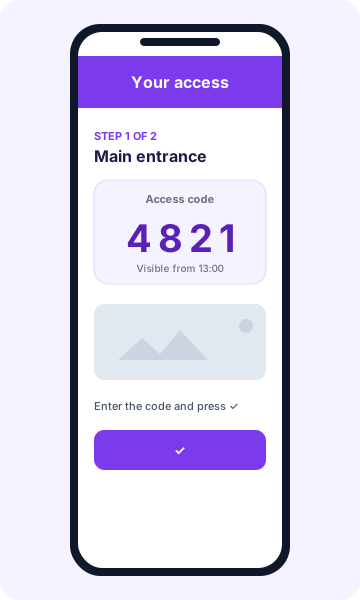
- No app to install: they open the guide from the link in their email or message.
- The guide appears in their language (automatically translated from the language you wrote the instructions in).
- Each door is a step, with instructions, photos and the code displayed large.
- The code is only visible within their access window: from check-in time minus the courtesy until check-out time plus the courtesy.
- If they arrive before the window starts, the guide tells them when the code will be visible.
Frequently asked questions
What if the guest has not completed registration?
They do not see the code. The guide stays locked until the form and all expected guests are registered, and the platform reminds them to finish. You can see in your dashboard who still has registration pending.
Can I use locks from several brands in the same property?
Yes, mixing brands and manual accesses.
Are the codes deleted from the lock if I unlink the property?
Not automatically. When you unlink, the lock remains in your manufacturer account; only its association with the property is removed. Codes already created are not deleted automatically.
My brand is not listed
Many more locks are compatible than the ones shown here. Write to us via Contact and we will check yours; and if it is a lock or key box with a fixed code, you can already set it up as a manual access with its guide.