Connect OwnerRez
with Registro Parte Viajeros
Connect OwnerRez to automate guest registration legal compliance. Import booking details and manage vacation rental contracts and official forms.

Choose who sends the link: OwnerRez or us
Using your OwnerRez templates is optional. Registro Parte Viajeros can also send registration links automatically. Choose your preferred method, or add our reminders as reinforcement.
OwnerRez connection configured by Diego Betancor, CTO of Registro Parte Viajeros.
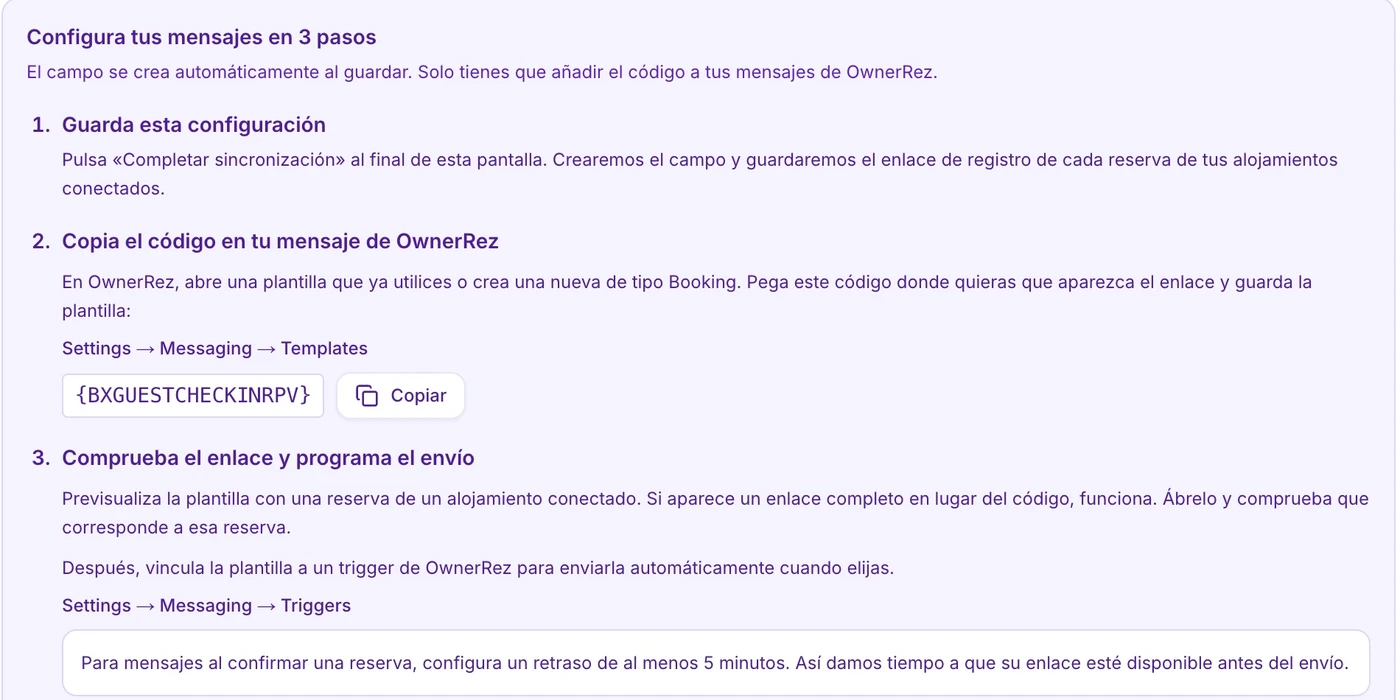
{BXGUESTCHECKINRPV}Add our reminders as reinforcement, or manage delivery in OwnerRez.
Connect your properties
Authorize OwnerRez and select Shortcode mode in Registro Parte Viajeros. We create the booking field automatically.
Add the code to your template
Paste the full code into an OwnerRez Booking template. Each synchronized booking supplies its own link.
Schedule and check delivery
Attach the template to a Scheduled trigger. Preview it with a booking and review the conditions before enabling it.
Integration features with OwnerRez
If you use OwnerRez, this connection digitizes your guest check-in process and automates mandatory registry books.
Connection Method
PMS API Connection & Booking Links
Sync Frequency
Automated booking information import.
Key Connection Advantage
Combine OwnerRez automation rules with digital contract signing and automated communication with law enforcement.
ID & Passport Reader (MRZ)
Instant optical scanning via guest mobile camera to avoid missing or mistyped data.
Legal Compliance RD 933/2021
Official entry form generation and automatic reporting to SES Hospedajes and police authorities.
3-Year Digital Custody
Secure cloud storage of mandatory registry books and signed forms for the legally required period.
Frequently Asked Questions — OwnerRez
How to link OwnerRez with our platform?
What OwnerRez data is used?
Does it work for any accommodation type in OwnerRez?
How is OwnerRez API key security guaranteed?
Do I need to manually submit OwnerRez data to authorities?
Which code should I add to my OwnerRez messages?
Do I need to create the custom field manually?
How are messages sent automatically?
Discover the benefits of connecting OwnerRez right now
Synchronize your OwnerRez reservations and automate guest registration in under 5 minutes.