In this article, we will explain in a simple and visual way how to add the tourist registration number of your accommodation in Booking, to comply with regulations and improve your guests’ confidence.
If you manage tourist accommodation in Spain, it is essential that you include your registration number on platforms such as Booking. This procedure is mandatory, as otherwise your accommodation could be removed from the list of properties and will not be visible to potential customers.
Step 1: Access the Booking Host Panel
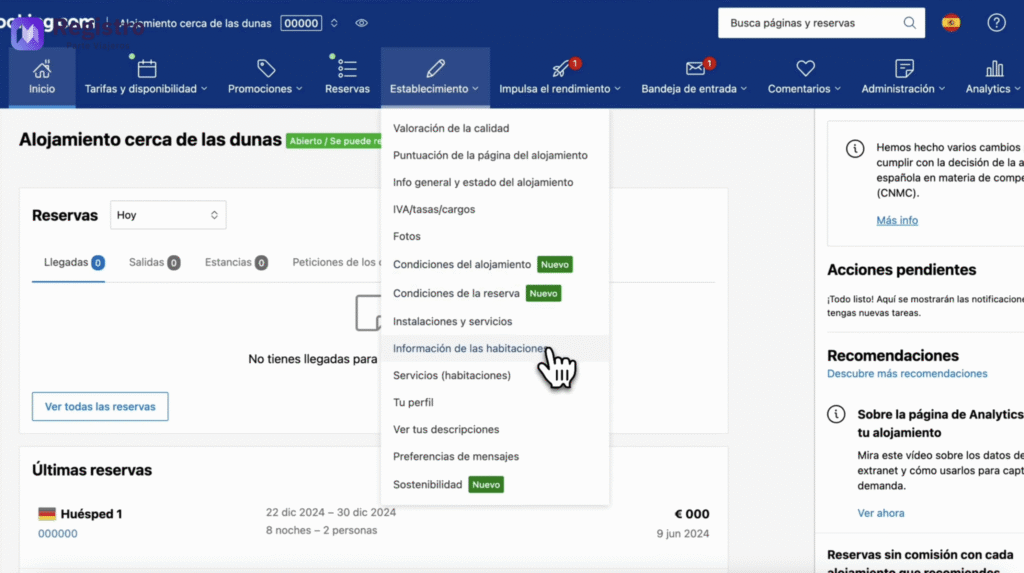
To get started, log in to your Booking account as a host. Click on your accommodation and select the tab labeled Establishment.
Within the “Establishment” section, go to Room information. Here you will find the basic details of your accommodation.
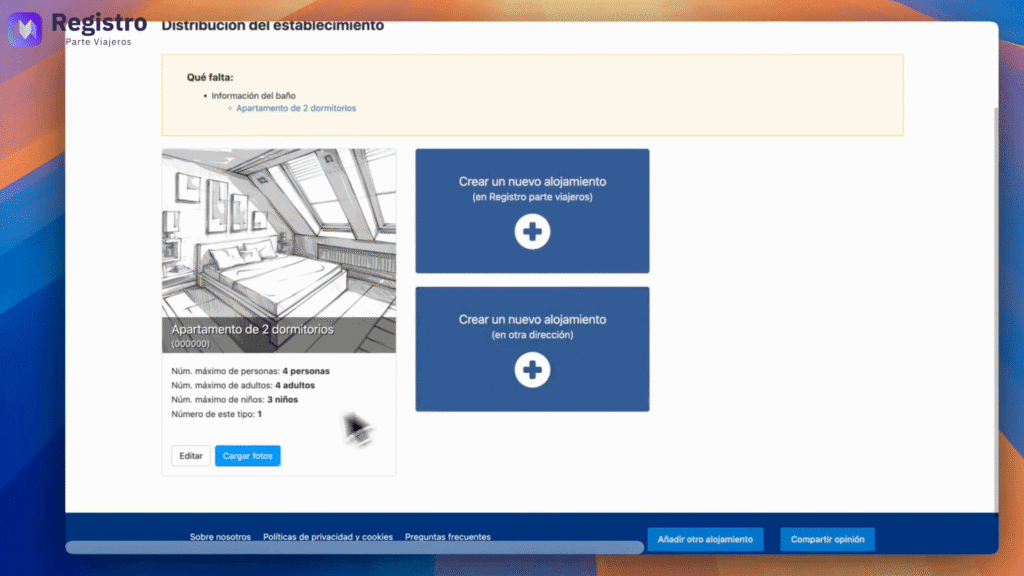
Step 2: Edit the Accommodation Details
Find and click on the Edit button. This will allow you to modify your property information.
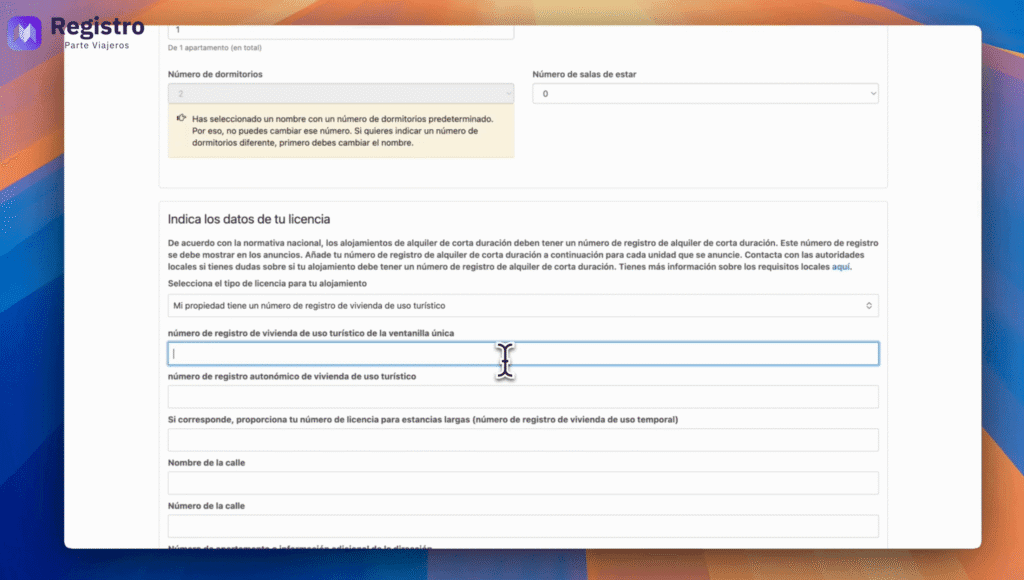
Step 3: Add the Tourist Registration Number
Now, locate the box that indicates Registration number for tourist accommodation from the one-stop shop. This field is key to complying with regulations.
Unique registration number | Alqulier registration number
Step 4: Obtain the Registration Number
You can obtain the registration number on the official website of registradores.org. If you don’t have it yet, you can watch our video.: https://www.youtube.com/watch?v=UD6YfbdWC-8
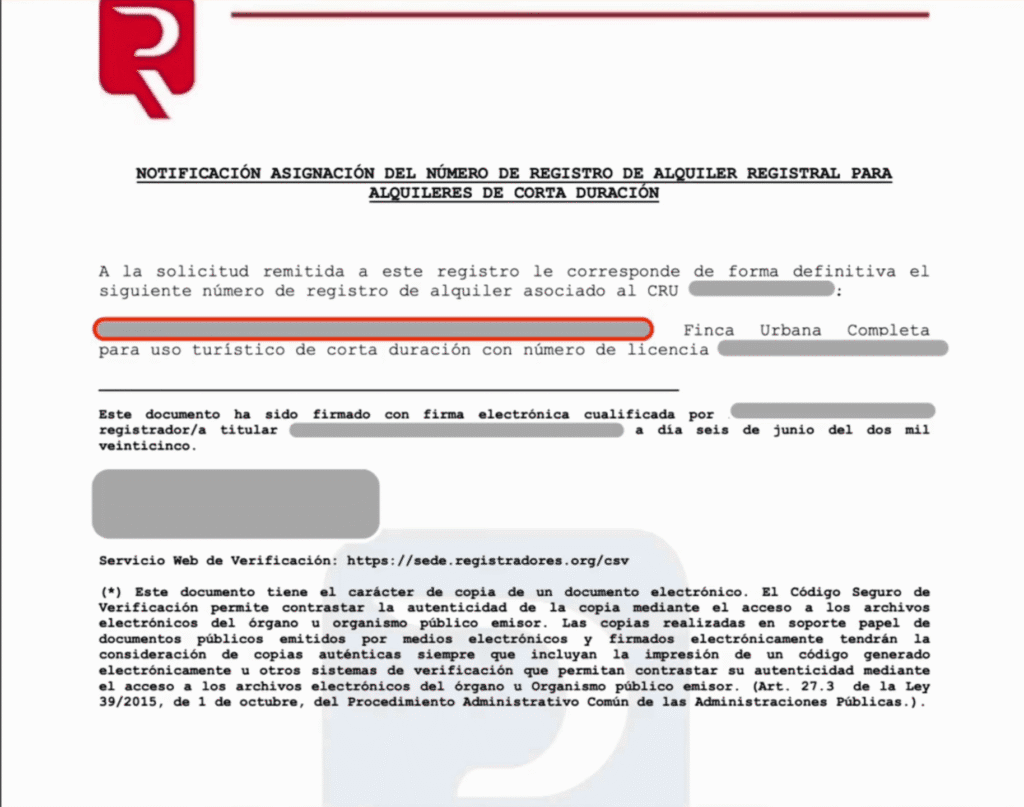
Once you receive the notification email, log in to the registradores.org website and accept the notification. You will then be able to download the file with the registration number.
Within that file, look for the line marked in red in the photo, which contains the registration number. Simply copy and paste that number into the corresponding field in Booking.
Step 6: Confirm and Finish
Go to the last section and click on Confirm. Congratulations! Your accommodation is now correctly configured on Booking.com.
Automate Passenger Registration with RegistroParteViajeros.com
If you wish automate passenger reports and shipping to SES Hospedajes, visit our website RegistroParteViajeros.com. We would be delighted to assist you with our solutions.
Para ofrecer las mejores experiencias, utilizamos tecnologías como las cookies para almacenar y/o acceder a la información del dispositivo. El consentimiento de estas tecnologías nos permitirá procesar datos como el comportamiento de navegación o las identificaciones únicas en este sitio. No consentir o retirar el consentimiento, puede afectar negativamente a ciertas características y funciones.
Funcional
Always active
El almacenamiento o acceso técnico es estrictamente necesario para el propósito legítimo de permitir el uso de un servicio específico explícitamente solicitado por el abonado o usuario, o con el único propósito de llevar a cabo la transmisión de una comunicación a través de una red de comunicaciones electrónicas.
Preferencias
El almacenamiento o acceso técnico es necesario para la finalidad legítima de almacenar preferencias no solicitadas por el abonado o usuario.
Estadísticas
El almacenamiento o acceso técnico que es utilizado exclusivamente con fines estadísticos.El almacenamiento o acceso técnico que se utiliza exclusivamente con fines estadísticos anónimos. Sin un requerimiento, el cumplimiento voluntario por parte de tu proveedor de servicios de Internet, o los registros adicionales de un tercero, la información almacenada o recuperada sólo para este propósito no se puede utilizar para identificarte.
Marketing
El almacenamiento o acceso técnico es necesario para crear perfiles de usuario para enviar publicidad, o para rastrear al usuario en una web o en varias web con fines de marketing similares.