

What is SES HOSPEDAJES?
SES HOSPEDAJES is a digital platform created by the Ministry of the Interior to facilitate the registration of travelers at tourist establishments. Through it, those responsible for accommodations must submit guest information, specifically a series of data, such as nationality, passport or ID number, contact details, the number of people who will be staying, among others.
The goal is to centralize and streamline this process, which was previously carried out through different channels. Currently, the regulation is the Real Decreto 933/2021, dated October 26. It is a mandatory measure for accommodation hosts. From Registro Parte Viajeros we offer you the possibility to digitize the process through our service saving you a lot of time and bureaucracy and allowing you to dedicate more time to improving your business and your free time.
Why is it important to register with SES HOSPEDAJES?
SES HOSPEDAJES is a mandatory platform for tourist accommodations in Spain, this platform is used to keep a record of guests staying in the country with the aim of combating crime and terrorism, ensuring the safety of guests and hosts, preventing fraud, facilitating communication with authorities when required, and monitoring the housing and tourism sectors.
Failure to register in SES HOSPEDAJES will result in the imposition of fines ranging from €100 to €30,000 and may even result in the closure of the establishment.
How can I register?
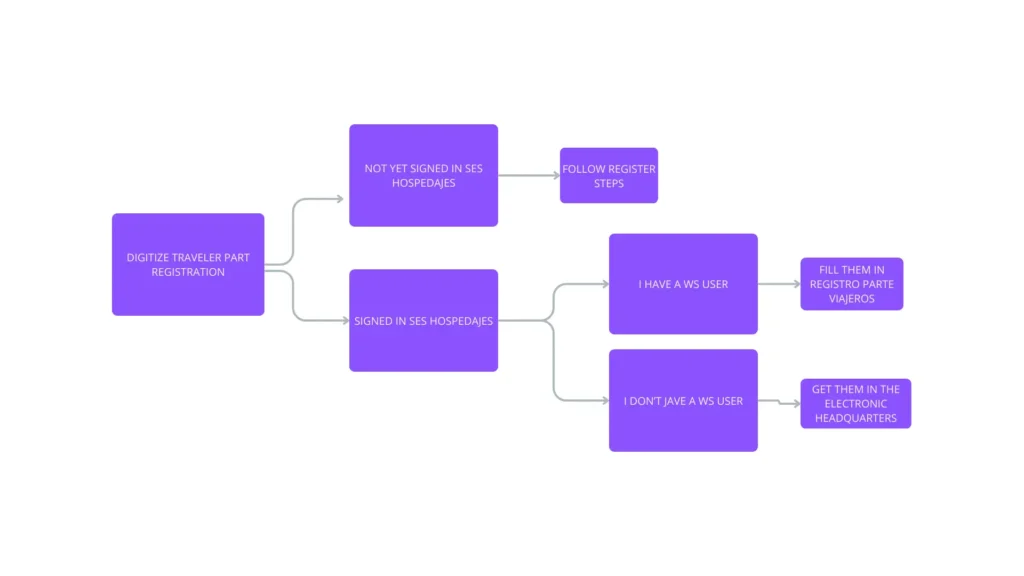
Registration in SES HOSPEDAJES is done through the electronic headquarters of the Ministry of the Interior, if you are not yet registered, you must complete the following steps to sign up at:
https://sede.interior.gob.es/portal/sede/tramites?idAgrupacion=18
This registration is mandatory and replaces the submission of data to the Civil Guard or National Police, except in regions with special regulations such as the Basque Country and Catalonia, which have their own platforms of the Ertzaintza and the Mossos collecting a similar number of data.
Accommodation registration
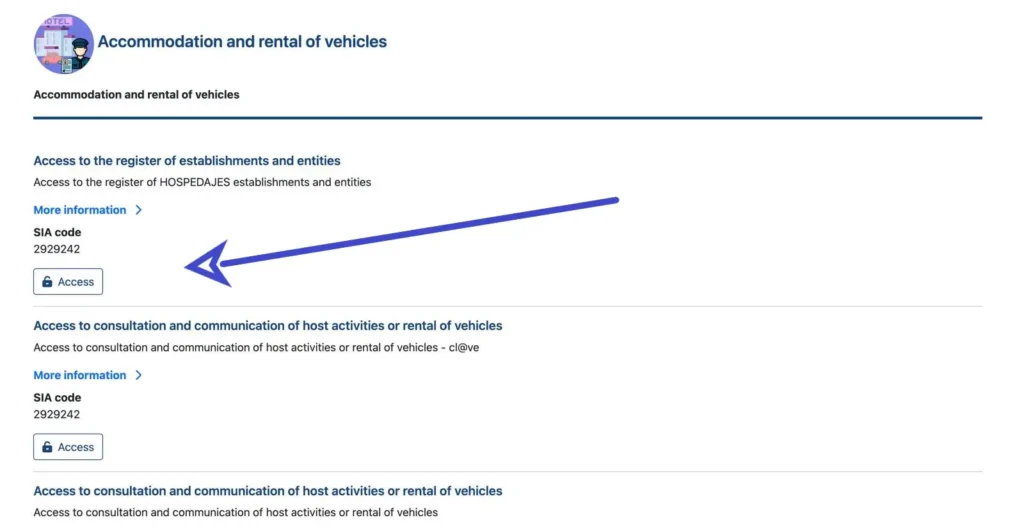
Step 1: Access the platform
The first step will be to access the headquarters of the Ministry of the Interior through the above link. Look for the section “Access to the register of establishments and entities” and click ACCESS to enter.
Step 2: Register with the available forms of identification
The SES.HOSPEDAJES platform requires you to use a form of electronic identification to access it. There are several options available:
• CL@VE PIN
• Electronic National Identity Card (DNIe)
• Electronic Certificate
• MOBILE KEY
• PERMANENT KEY
If you do not yet have any of these identification methods, we recommend that you obtain one by following the instructions available on the Ministry of the Interior website or by visiting https://clave.gob.es/clave_Home/registro.html
Posibles problemas:
- The page stays blue constantly:
- We recommend using a computer with the Autofirma program if you are using a digital signature. To download autofirma, go to the following link.
- Normally, some mobile devices may encounter errors when registering with SES Hospedajes.
- We recommend using a computer with Chrome to register, although you can also do so on your mobile phone.
Step 3: Register your place of residence
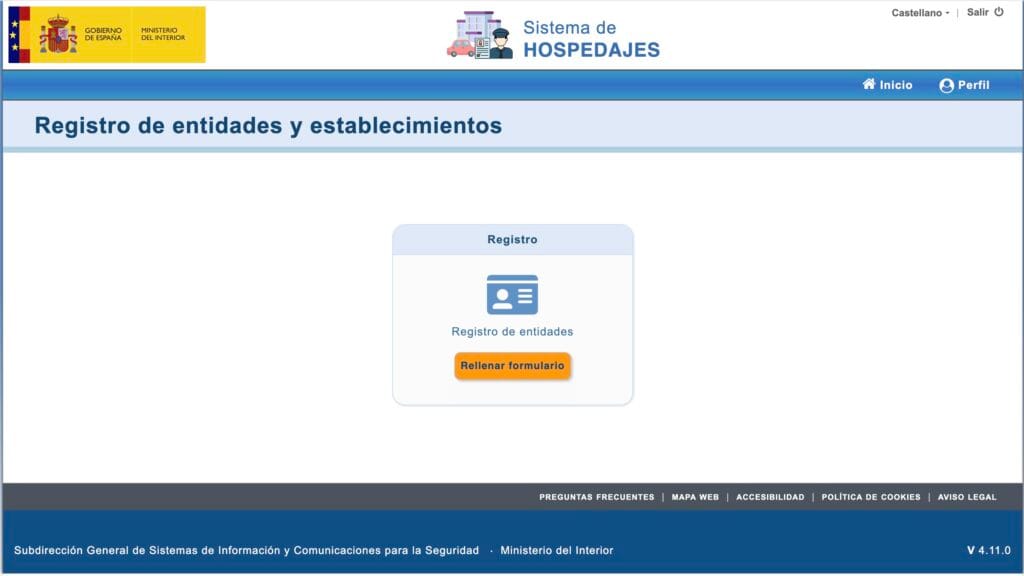
When you log in, you will see the option to fill out the entity registration form. Click on Fill out form.
Step 4: Fill out the form
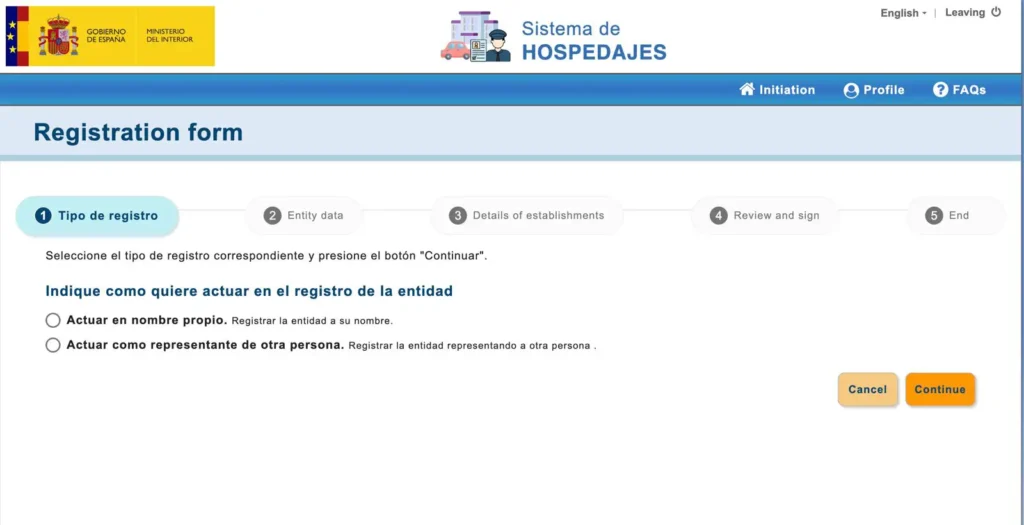
4.1 Select representation
Once this option is selected, we will be asked to indicate whether we are acting in our own name or as a representative of another person, this option refers to managers of tourist accommodations who manage the accommodations of other individuals.
4.2 Fill in personal and contact information
After continuing, it will ask us to fill in our personal and contact information:
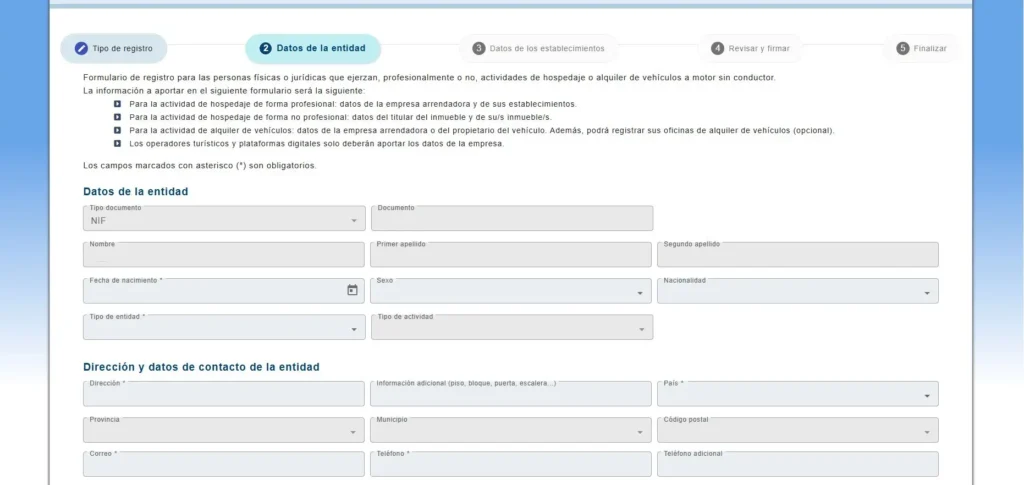
It is important that in the section “Tipo de entidad” we select “Hospedaje”, since the other options refer to large entities or management platforms, such as Booking.com or Airbnb. As individuals or companies that manage tourist accommodations, our activity is legally classified as “de hospedaje”.
4.3 “Sending communications via web service“:
Complete the form with the accommodation and owner information, ensuring that you include all the details required by SES Hospedajes. It is extremely important to accept the sending of communications via web service, as this will allow registroparteviajeros.com to send travel reports on your behalf.

In addition, in the web service error notification email, you will need to enter the following email address: [email protected]
‼VERY IMPORTANT: Select “Communication sending via web service”
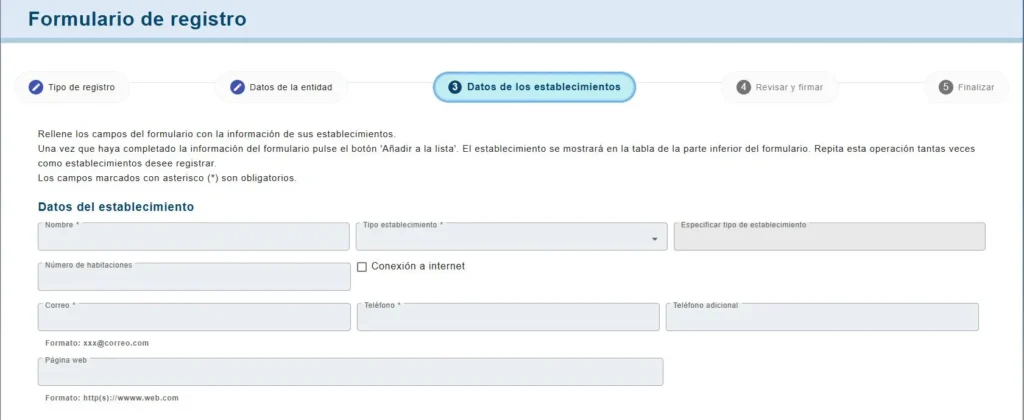
4.4 Establishment Data and add addresses
Our next step will be to fill in the details of our establishment, where we must select its name, the type of establishment, the number of rooms, whether it has internet connection, and the contact details. The website is optional, however, Registro Parte Viajeros offers you the service to create a personalized website for your accommodations.
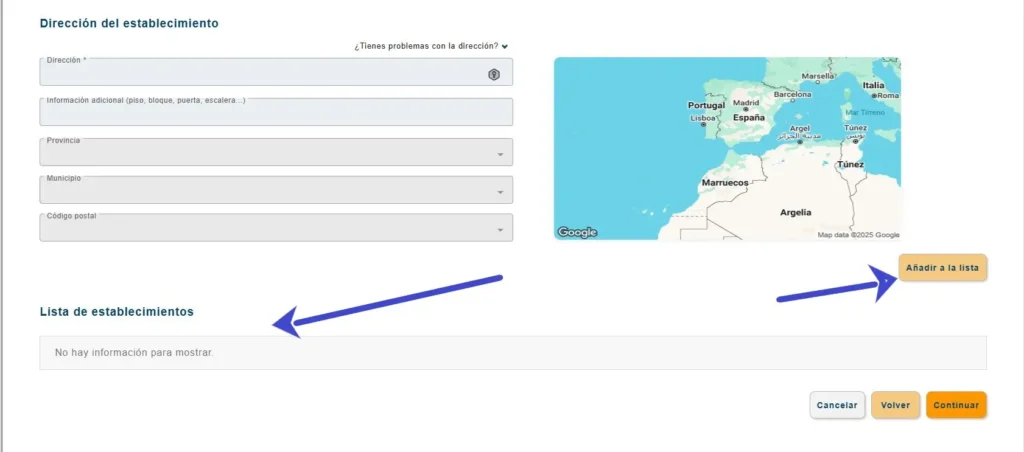
At the bottom, a list of the establishments we register will appear, and we must add them to the list, keep in mind that all the establishments you register will be linked to the entity you are registering:
4.5 Review and sign
Finally, you would only need to review the entered data and sign them with the Autofirma application, remember to have it installed on your device.
I am already registered at SES Lodgings
I don’t have the credentials that end in WS
Credentials ending in WS are those that allow you to automate traveler registration with Registro Parte Viajeros and other OTAs. One sign that you do not yet have credentials for the web service is that when entering the portal for the Registration of entities and establishments, only these 3 options appear:
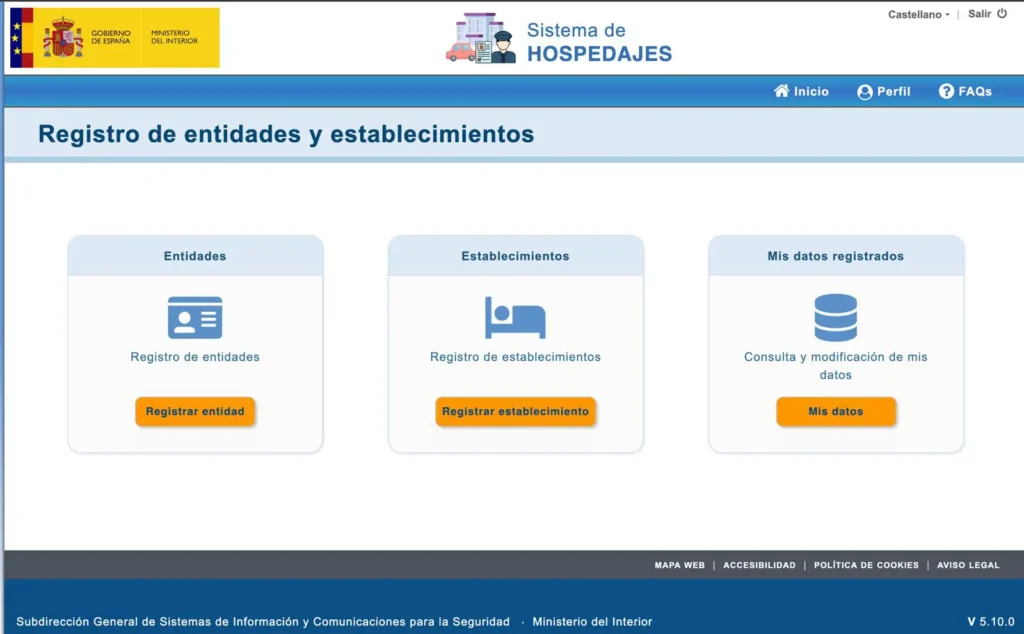
If you were already registered in SES HOSPEDAJES but do not have the credentials for communication via web service, within the electronic headquarters, we will enter the Registro de entidades y establecimientos and we should select the option: “Consulta y modificación de mis datos”:
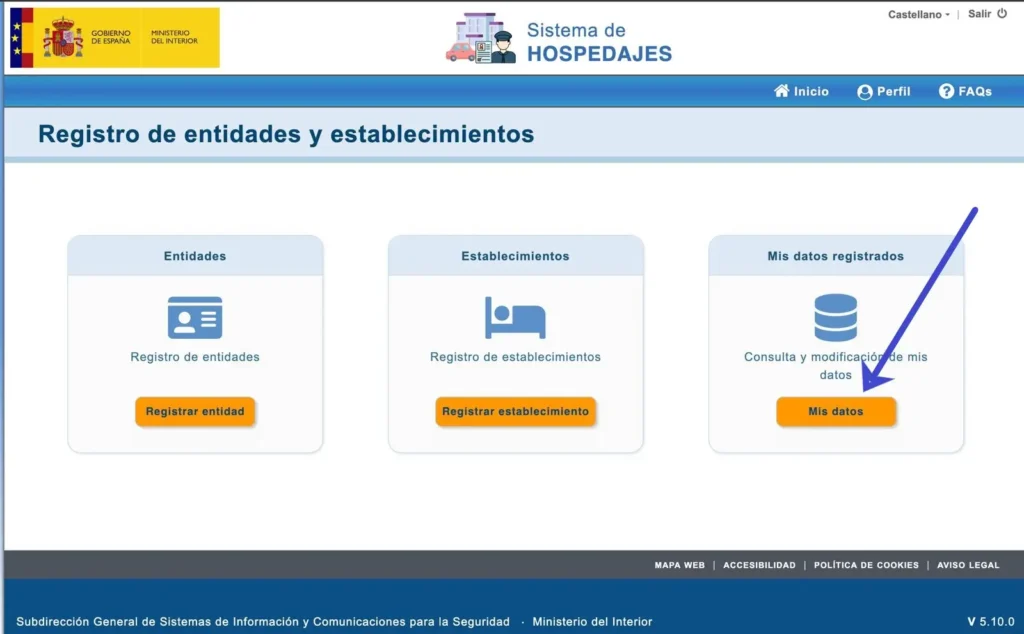
Once there, we will continue by selecting the box that enables Sending communications via web service and fill in the email with the following address: [email protected].
I don’t remember my credentials
If on the contrary you already had it activated, but do not remember the credentials, you can either visit the registered email and look for the email from [email protected] or manage and change the credentials from the SES HOSPEDAJES electronic headquarters by clicking on “Access credentials management for the web service”:
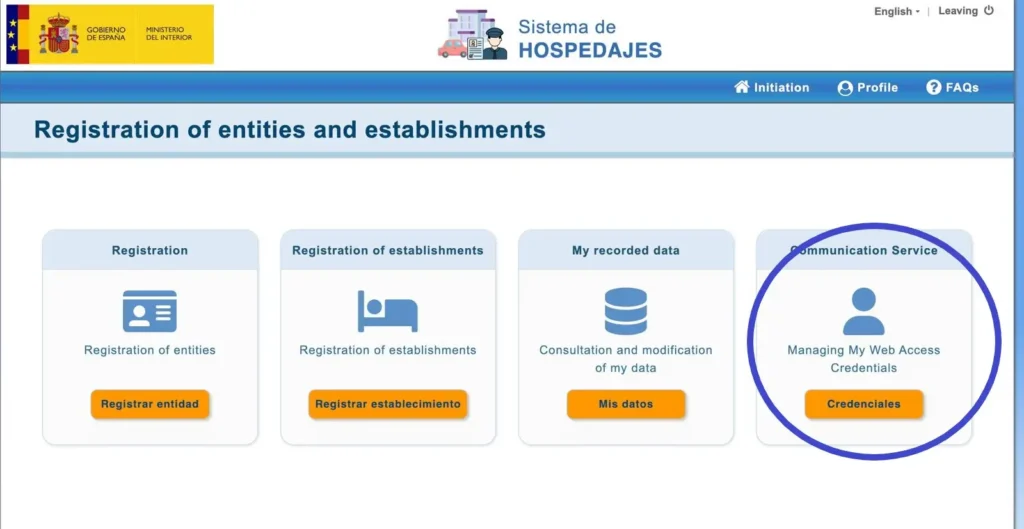
Within this section, we will be given the option to select which entity we want to query the data from, we will select each of the entities we manage, upon selecting it in the dropdown a user ending in WS will appear, this user will be the one we must enter for the automation of the registration. We also recommend changing the password for each user, as it is essential for performing the registration and querying traveler reports:
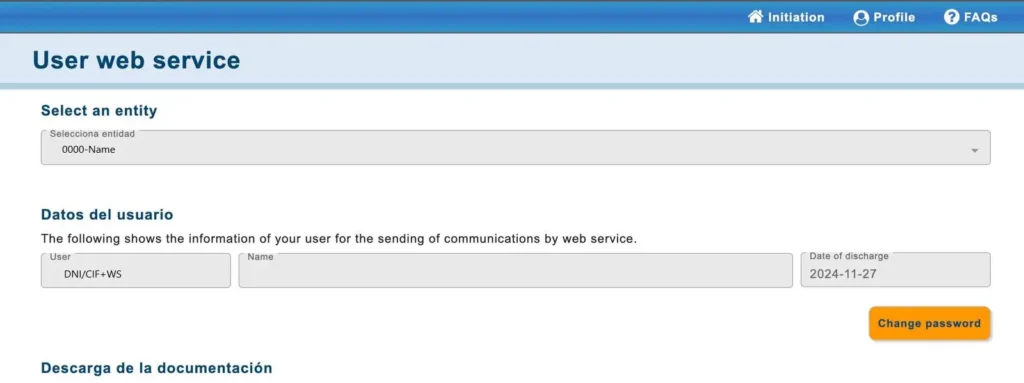
This username and password will be the ones we enter in the Travel Log Registration application to allow us to manage the automatic sending of registration reports.
Obtain the landlord and establishment code
The landlord and establishment codes will be sent to you via email from: [email protected] You will receive this email once you register with SES Hospedajes, and it will look similar to the following:
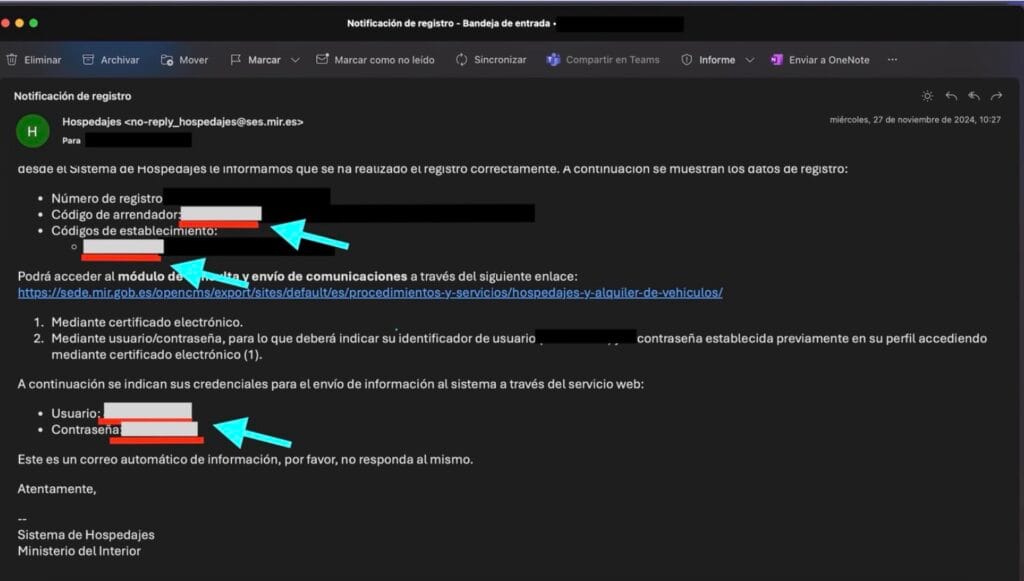
Whenever you want to consult them, you must go to this email, if we had deleted the email you can consult it on the SES HOSPEDAJES platform, for this we will select the option “Query and modification of my data”:
Whenever you want to consult them, you must go to this email, if we had deleted the email you can consult it on the SES HOSPEDAJES platform, for this we will select the option “Query and modification of my data”:
You then, can select the slide bar and select an entity, after doing this there should be a user ending with WS:
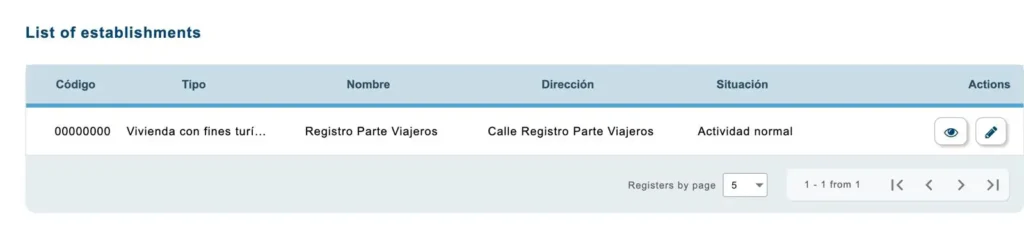
You can consult the establishment code in the left part of the lists of establishments, each user is linked to a number of establishment codes that are set whenever you register a new one:
Automate registration with registroparteviajeros.com
Once the following data has been located:
- Establishment code
- Landlord code
- User
- Password
We will proceed to automate the sending of traveler registration reports by entering the Traveler Registration Report application, where we will enter the collected data.
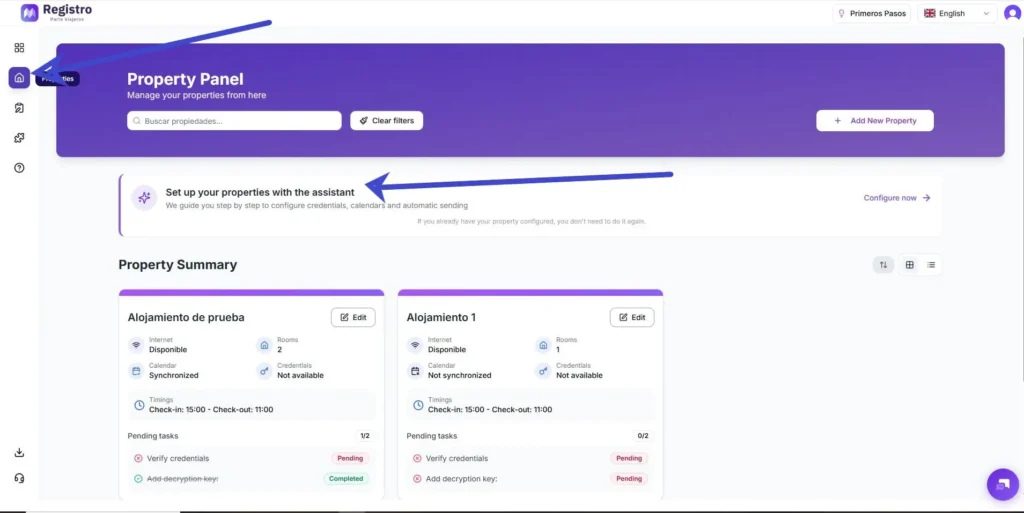
- The first step will be to enter our virtual assistant from our application, for this we will select the 🏠properties button at the top left and click on “Configure your properties with the assistant”:
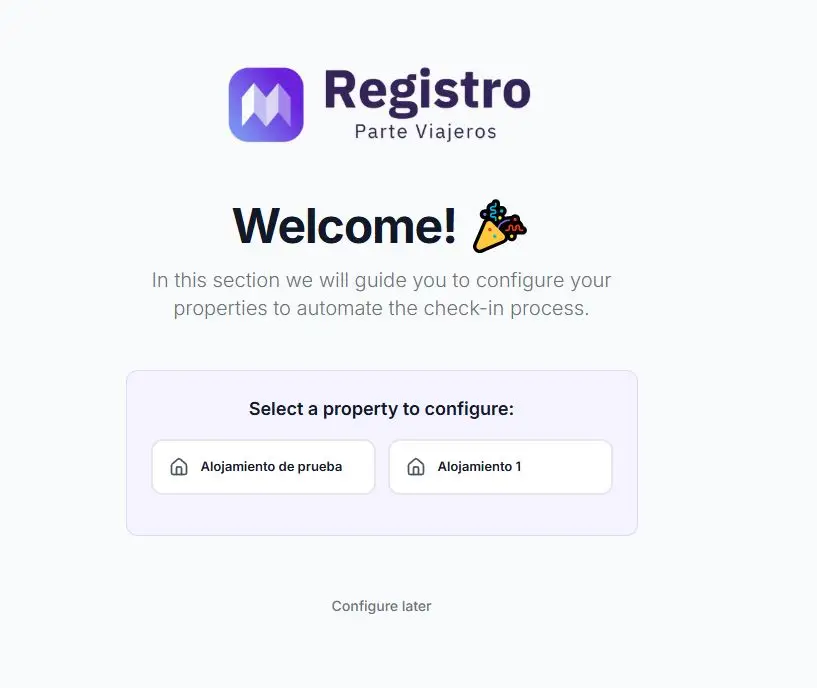
2. The second step will be to select the property that we want to configure:
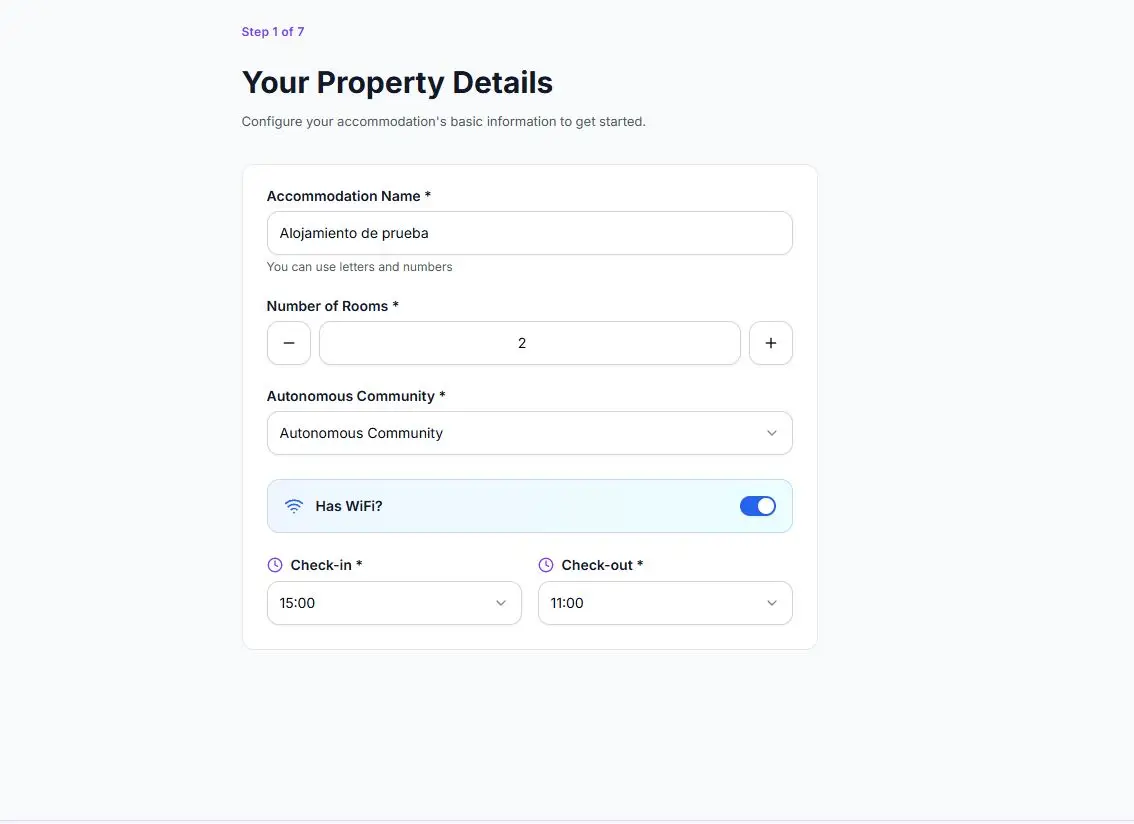
3. Here we will start to enter the data of our property:
4. We will set up a encryption password to be able to open the PDFs with the registration data entered by the guests:
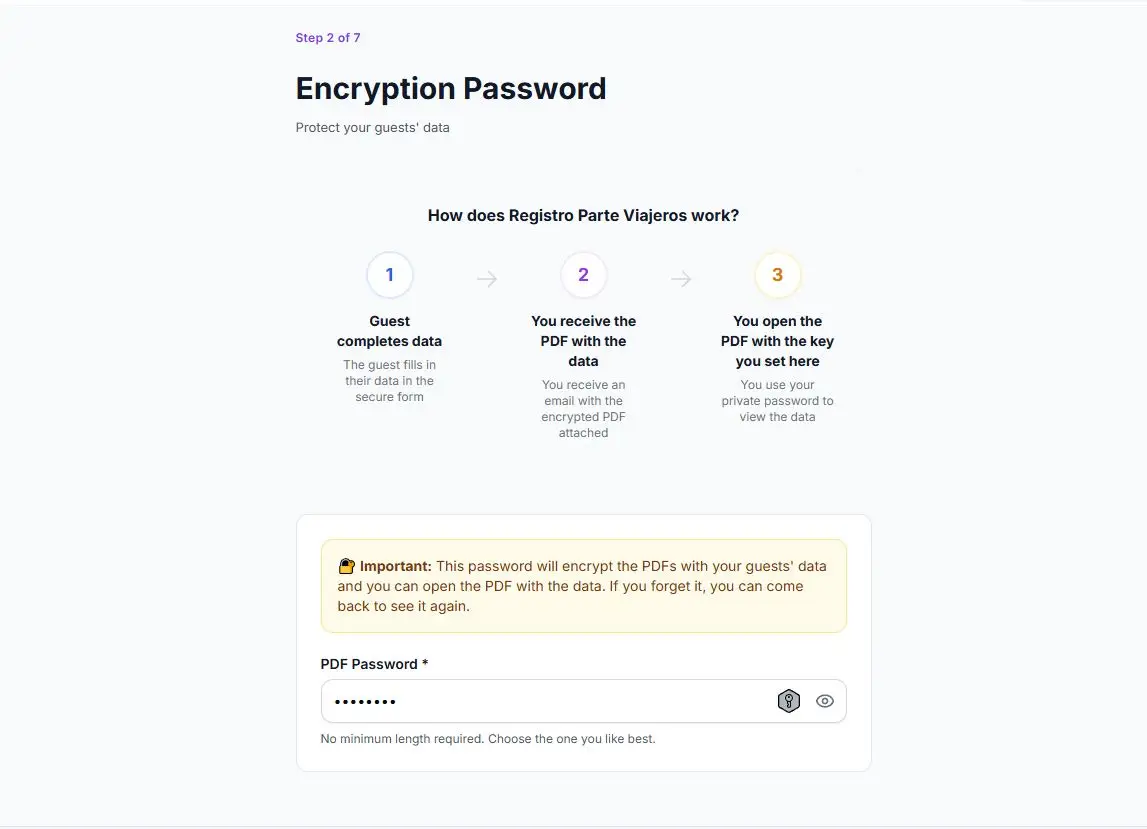
5. Next, we will select the shipping method. We can choose to perform the automatic sending through the chats of your booking platforms, such as Airbnb, Booking.com, Holidu, or VRBO, this is the most convenient option for users, but there is also the option to send them manually:
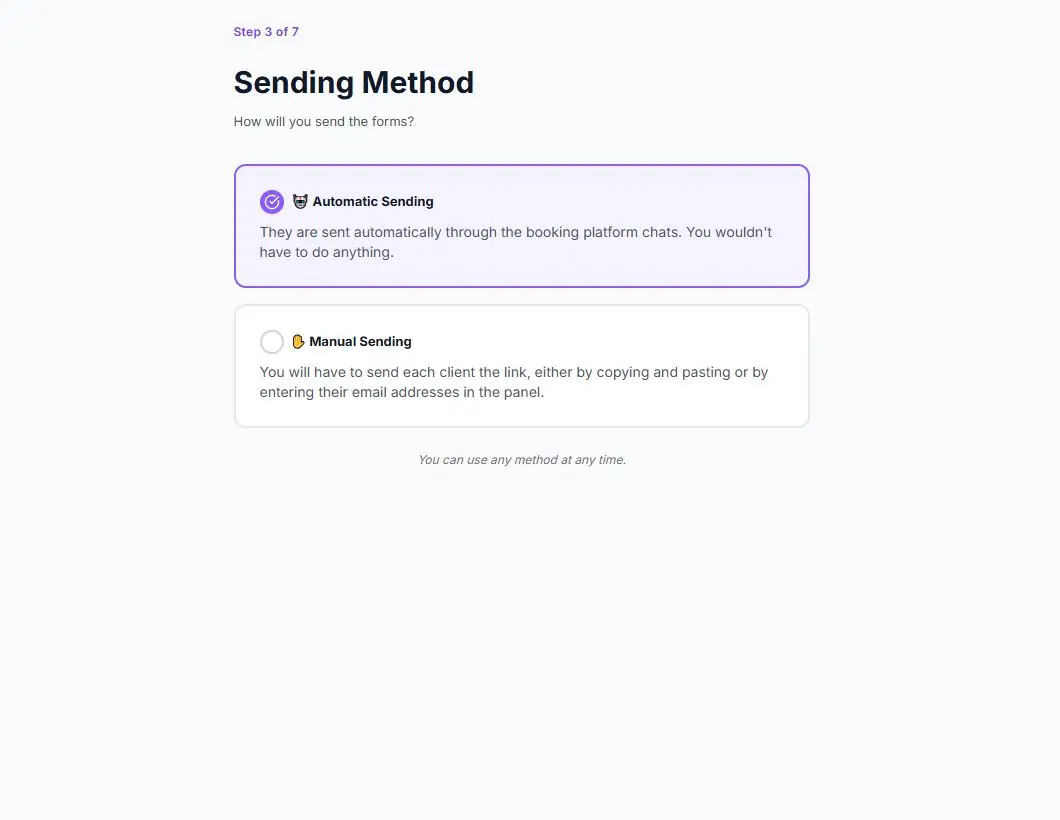
6. We will select which platforms we want to perform the automatic integration on and we will copy the message to paste it into our trusted OTA, below the button to copy the message we include the instructions to perform the automatic integration on Airbnb, Booking, Holidu, and for the rest that operate in the market:
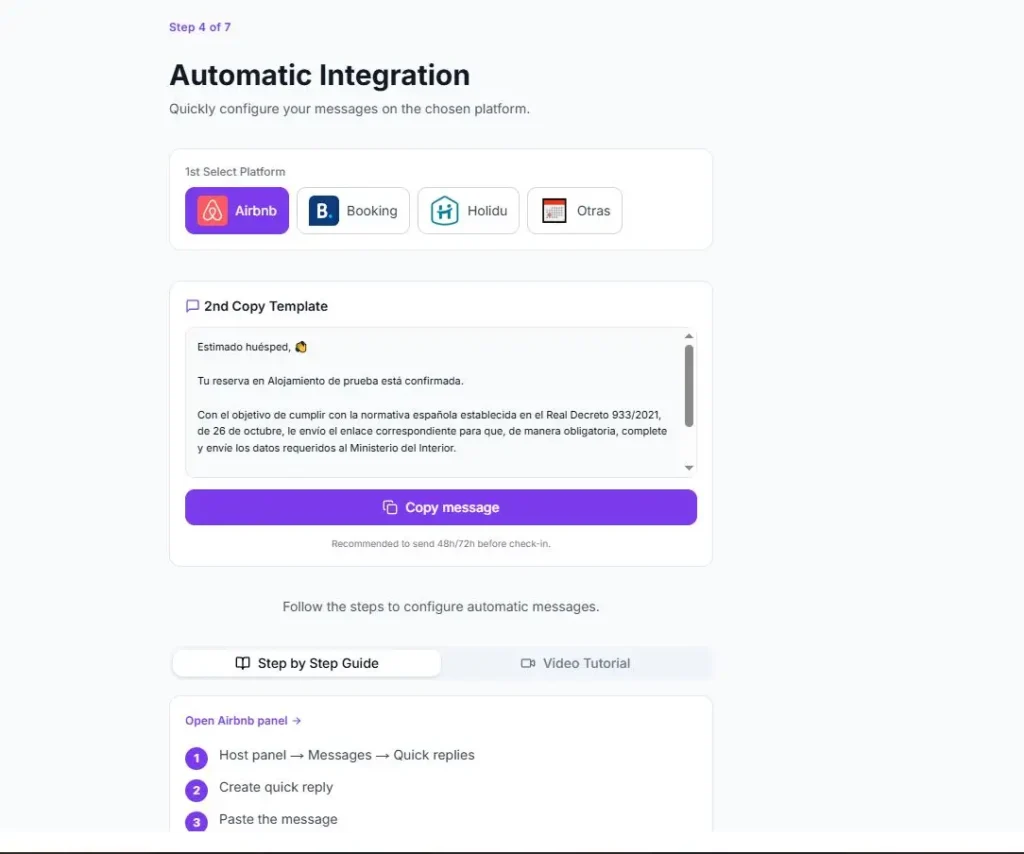
7. We will select if we want to be notified when our guests do not fill out the traveler form. This option is quite important because if the obligations are not fulfilled, the host is the one who assumes the responsibility:
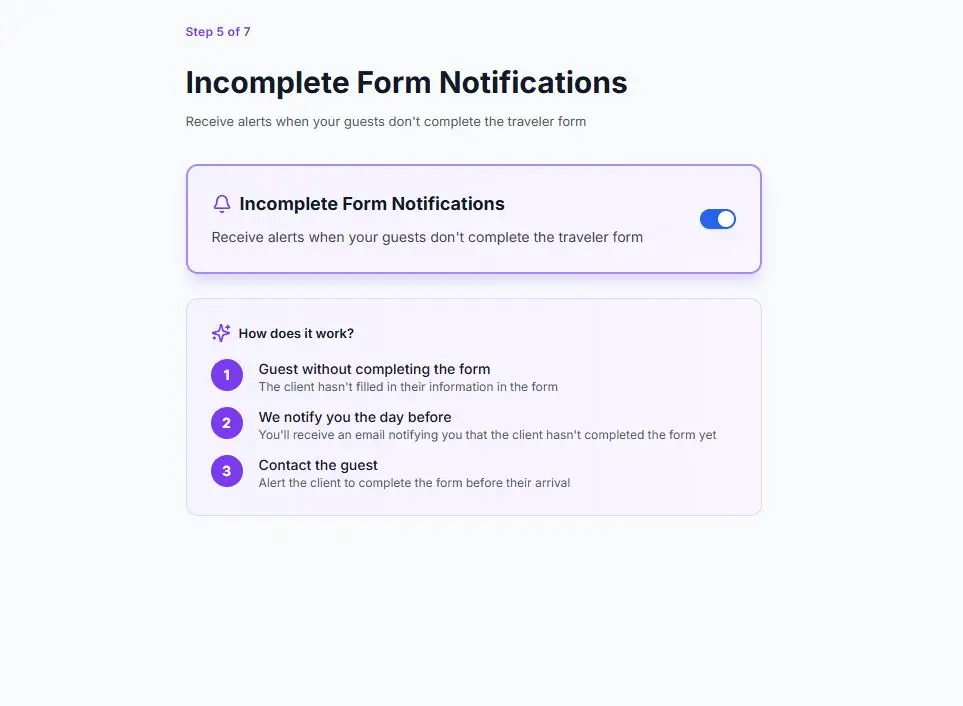
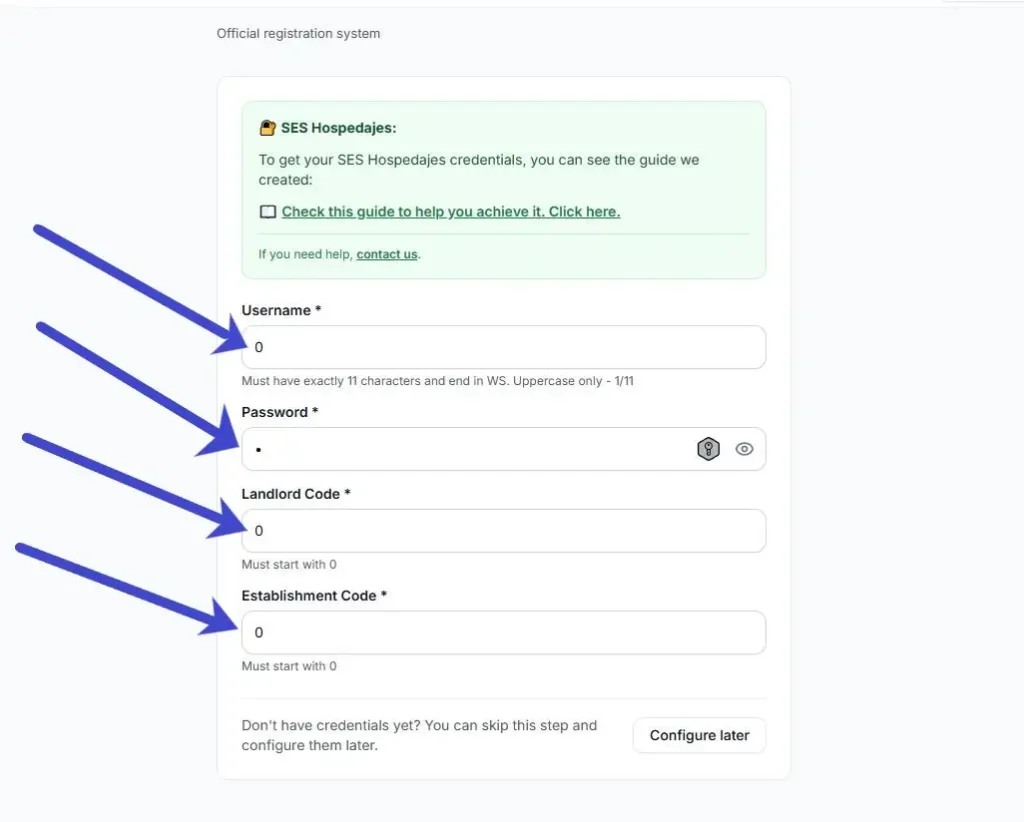
8. We will configure the Calendar of our OTA to synchronize with the application following the integration instructions on our website and fill in the data collected from SES HOSPEDAJES: the Web Service user (ending in WS), the SES HOSPEDAJES password, the lessor code and the establishment code we are registering:
🎉 Congratulations! You have SES HOSEPDAJES configured
Having set up SES HOSPEDAJES with Traveler Registration, you can now use all our services and reduce the time you spend on the bureaucracy of your tourist accommodations.


