

The obligation of Order VAU/1560/2025
Since January 2, 2026, the new regulation with Order VAU/1560/2025 has come into effect, this obligation is recorded in the BOE: https://www.boe.es/eli/es/o/2025/12/22/vau1560. establishing the obligation to submit an annual informational form, which will be carried out through the N2 program of the Property Registrars Association.
🧍♂️Which accommodations are required to register their guests?
All short-term accommodations, whether rented professionally or not, even if they are not rented regularly if advertised through online booking platforms. However, hotels, motels, aparthotels, motels, or campgrounds should not be registered.
🏘What is meant by short-term accommodations?
It refers to all those rentals for tourist or vacation purposes, for students, for short stays for work, and for medical reasons.
📋 What data do I have to record for each accommodation?
For each accommodation, the Unique Rental Registration Number must be indicated, if this accommodation has had activity during the previous year and for what purpose it has been used.
👉How do I get the Unique Rental Registration Number?
The Unique Rental Registration Number (NRUA) can be obtained through the website of the College of Property Registrars by accessing its electronic office or by submitting a paper form at the College of Property Registrars. At Registro Parte Viajeros, we offer you a guide to obtain this number.
📤 What data do I have to send for each guest?
For each of the accommodations made last year, you will only need to send the number of guests, your check-in date, and your check-out date for each of the holiday homes identified with the registration number indicated above.
✅Campos que deben completarse para cada alojamiento (NRUA)
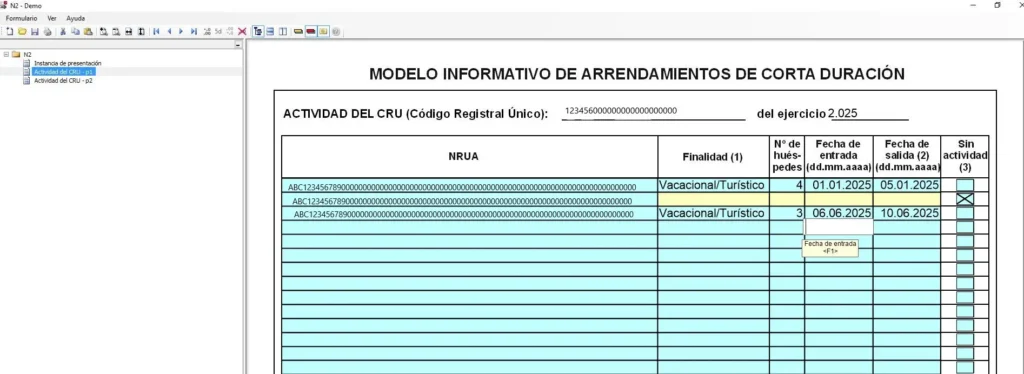
–Purpose of the Accommodation: indicating a number between 1 and 5 according to the type of lease, in order: vacation/tourist, work, studies, medical reasons, and other reasons.
–Number of guests: Actual number of guests staying at the accommodation
–Entry date: in dd/mm/yyyy format at the guest’s access to the accommodation
–Departure date: same format dd/mm/yyyy, on the departure day, if it is not delivered it will be considered that the accommodation remains active.
– Activity box: This box should only be checked if the accommodation was inactive during the past year.
What is the N2 program and why is it important?
The Programa N2 is the tool provided by the Property Registrars Association to complete the Annual Short-Term Rental Registry Submission Form, it can be downloaded from the electronic headquarters of the Property Registrars Association.
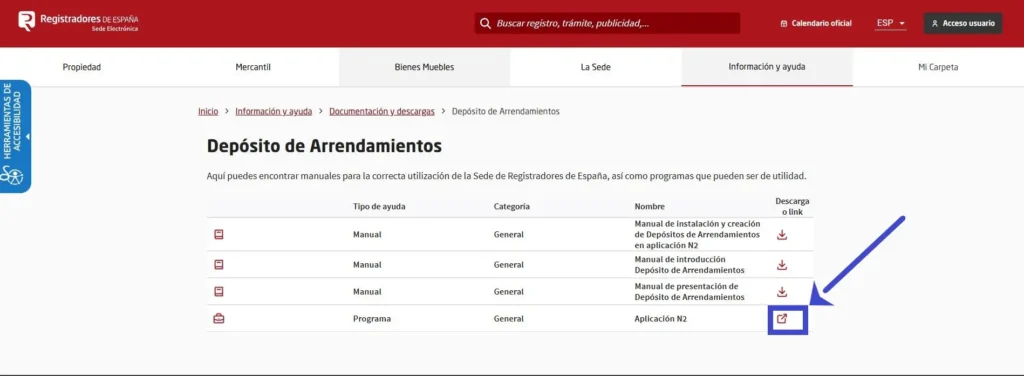
We will later explain how to use it as an alternative to the personalized Travelers’ Party Registration service.
We will later explain how to use it as an alternative to the personalized Travelers’ Party Registration service.
The consequence of not submitting it on time and in the correct manner, that is, in February of each year and with the correct information, will be the revocation of the Unique Registration Number and therefore, not being able to provide lodging services until it is obtained again.
➡How do I send this data?
The Administration asks us to fill out a form that we will have to submit through the Single Digital Window for Leases on the website of the Ministry of Housing and Urban Agenda or on the website of the College of Property, Commercial, and Movable Goods Registrars of Spain. And in any case through the N2 program made available by the Property Registry.
If you want to know more, click the following link.
🚨User Guide for Program N2
1. Now is the time to choose, we will select whether you want to use the N2 program to fill out the Annual Register or do it automatically with the Travellers’ Part Register:
1.1 To use the N2 program we must access the SetupN2.exe file that we previously downloaded and install it:
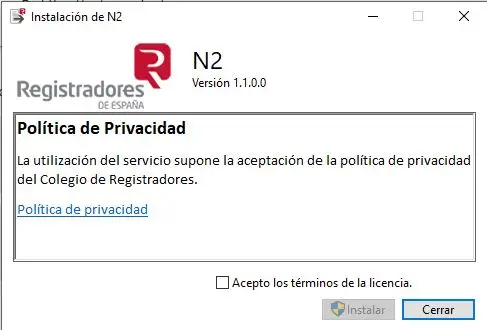
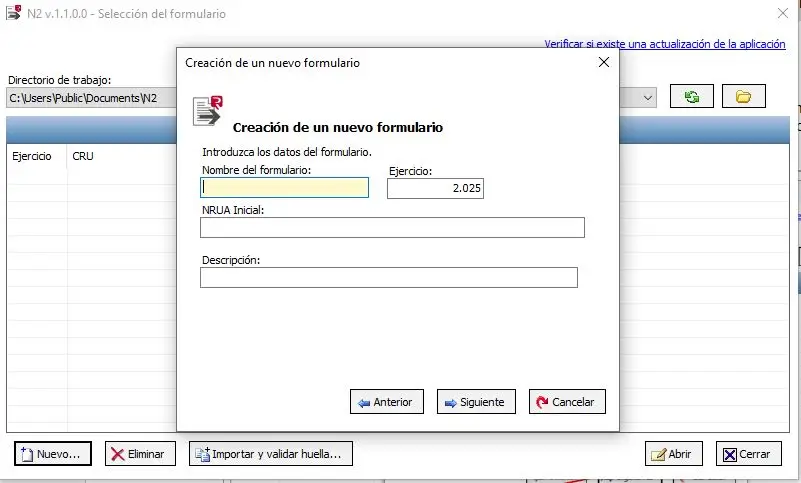
1.2 Once installed, we will open the N2 program and click on the “New” option to start filling out the Register:
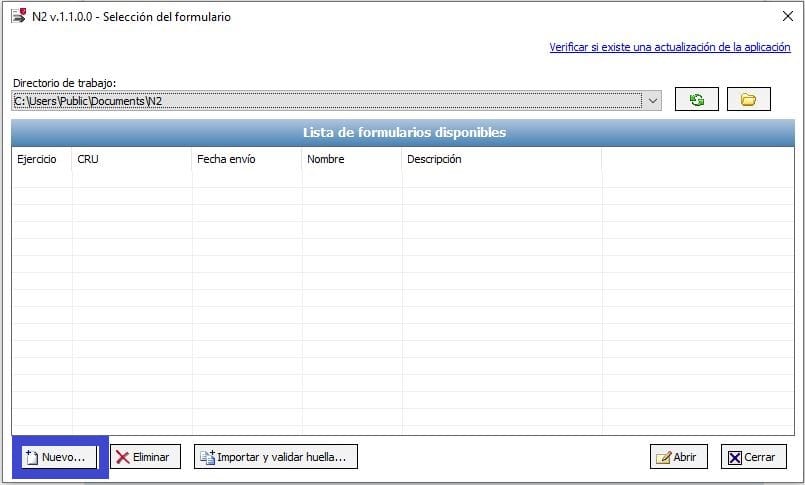
1.3 And an option will pop up for us to set the basic form data, filling in the name we will give it, the Unique Registration Number of the first property on which we will carry out the annual registration, and a brief description:
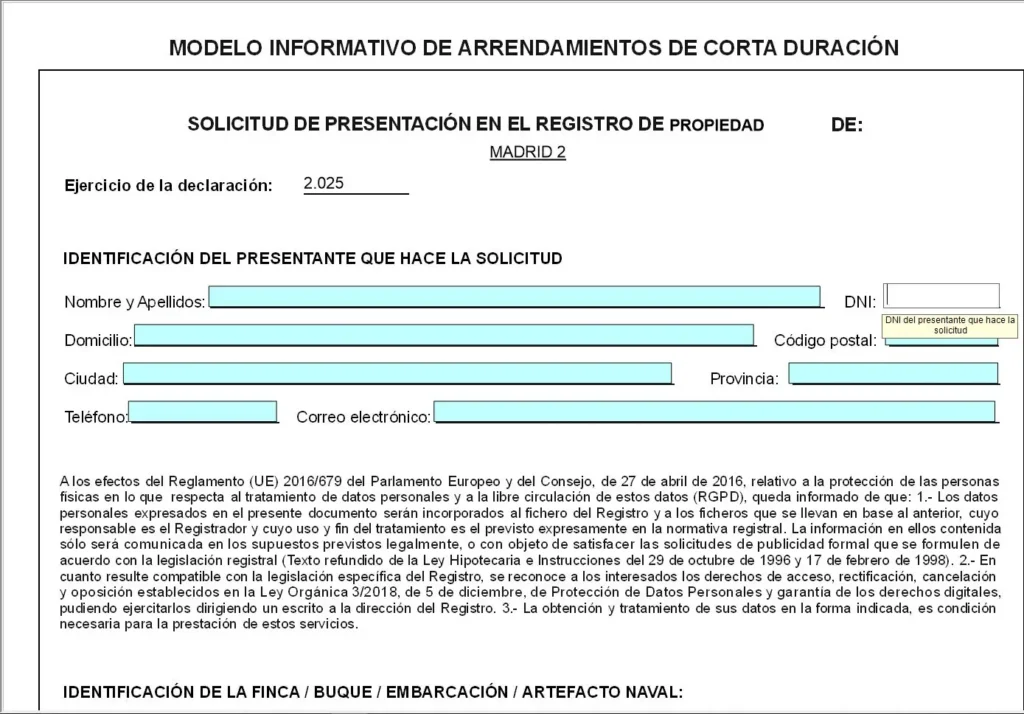
1.4 A form similar to a pdf will open in which if we choose the manual option we must fill in our personal data for the submission:
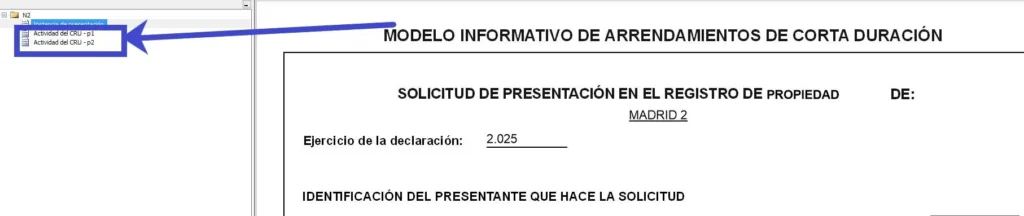
1.5 We will click on the upper left part of the screen and start filling in the annual guest registration data:
🤖Import Registration Data Travelers Part
On the contrary, if we wanted to fill our file with the Datos proporcionados por Registro Parte Viajeros, we would continue with the following steps:
1️⃣ First, we will press the download icon and select the option “Export data for NRA”
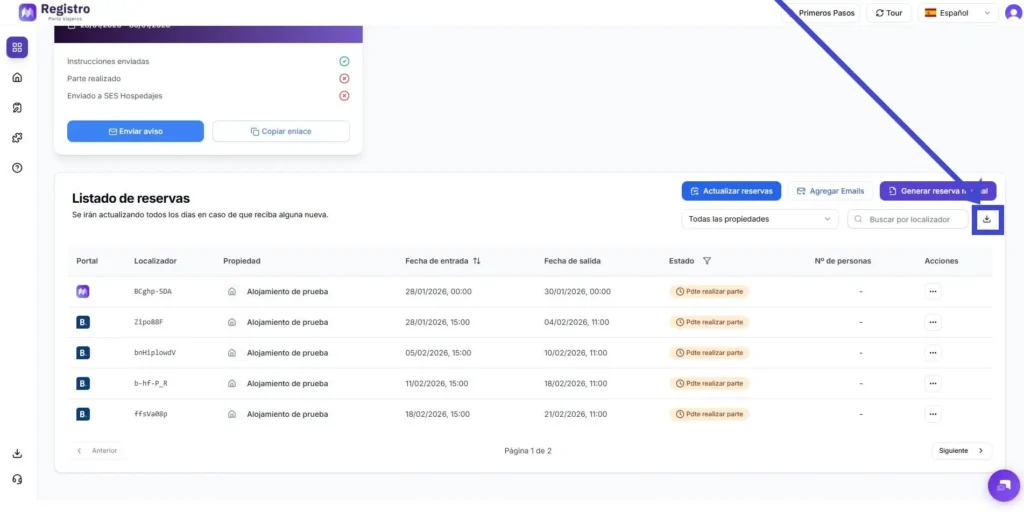
2️⃣ Secondly, we will indicate which registration parts we want to send, those we have already sent to SES HOSPEDAJES or those we have not sent yet:
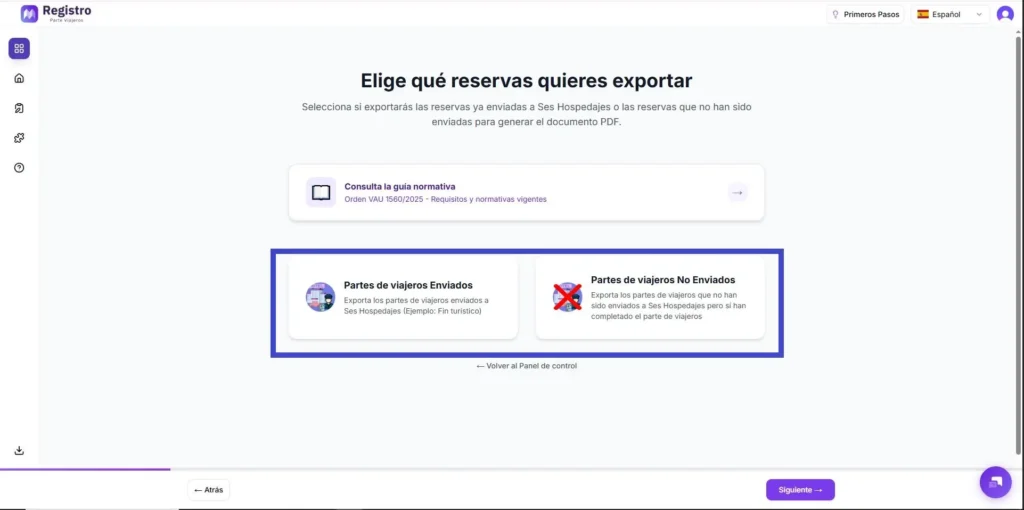
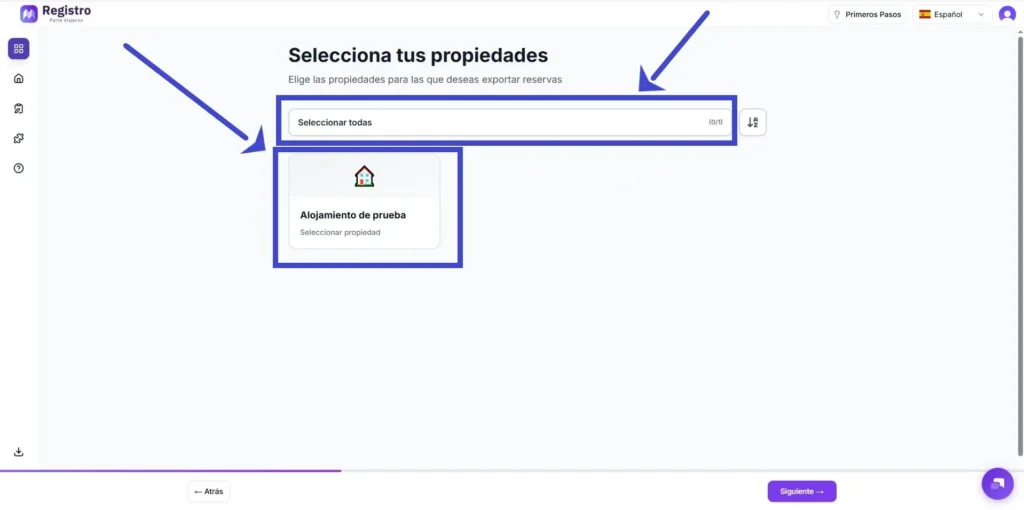
3️⃣ The next step would be to select the option Exportar datos para N2 and enter the Unique Rental Registration Number NRUA in the field for each property.
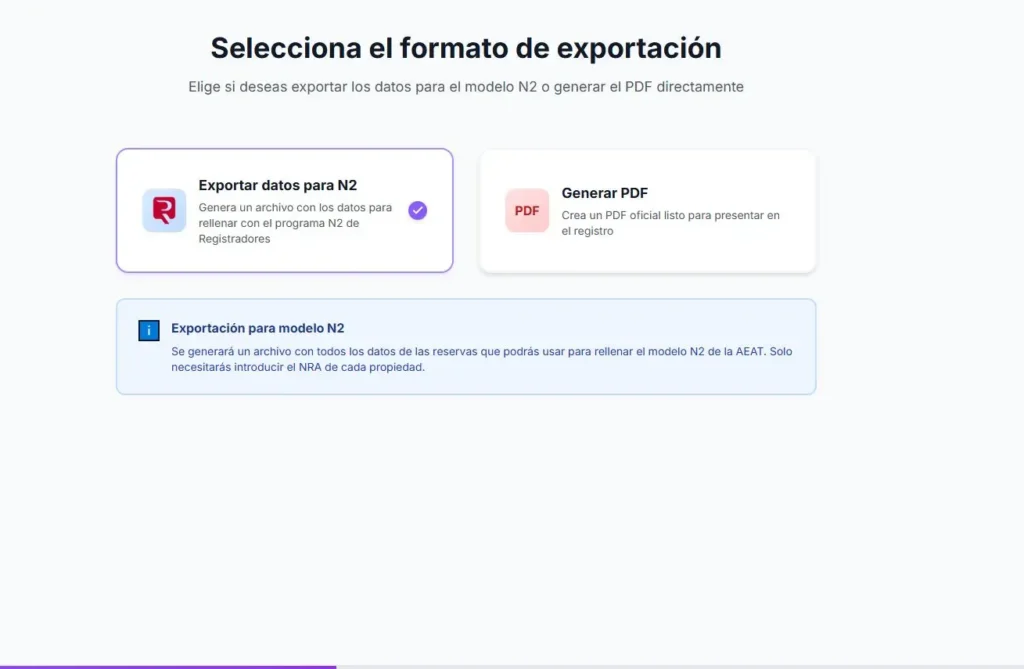
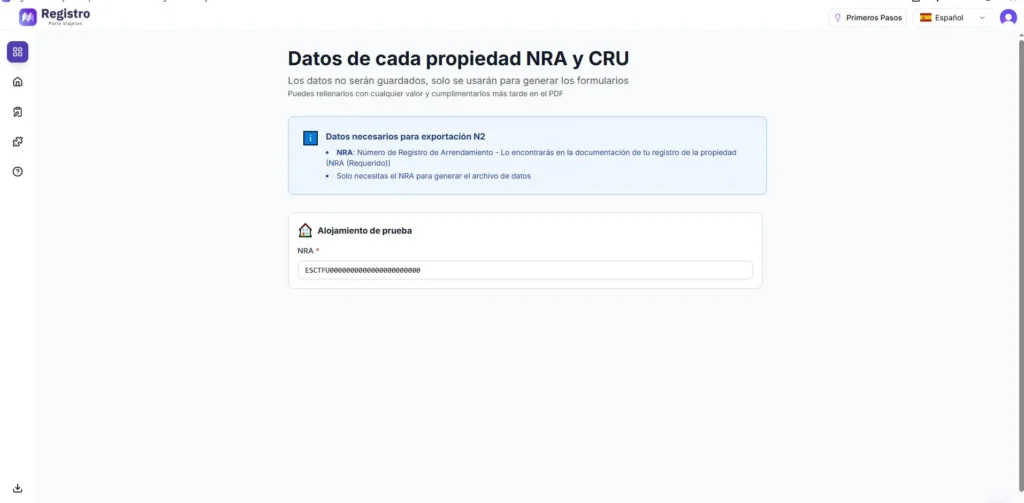
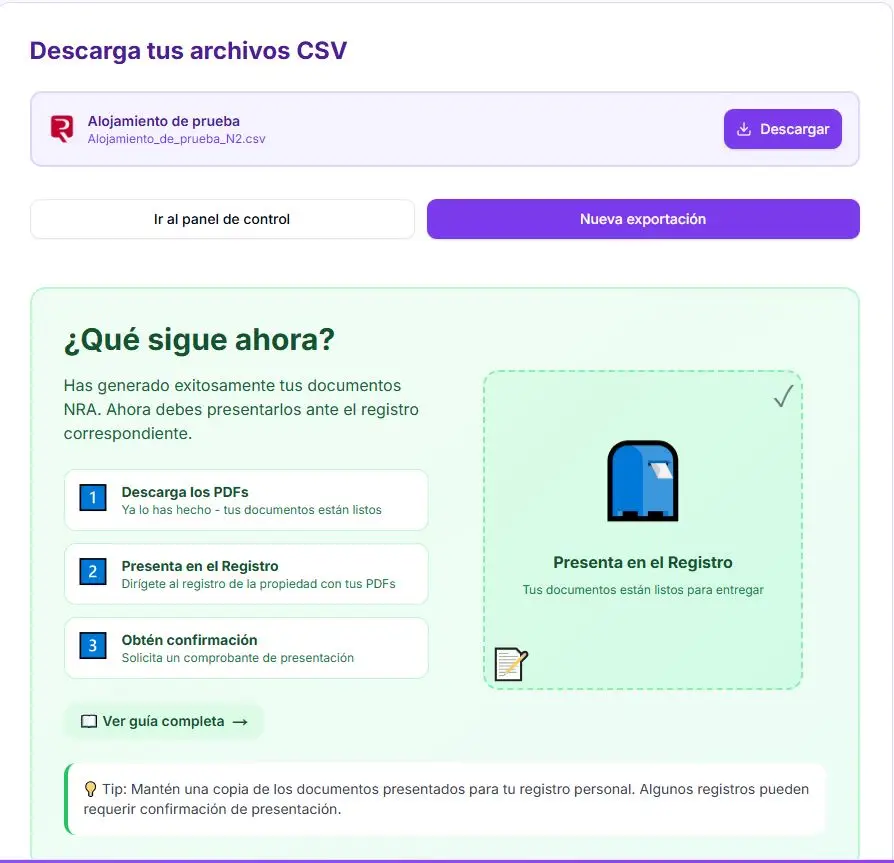
4️⃣ We would have completed all the steps on the website and will only need to download the CSV with all the property data ready to deliver to the Property Registry. The data will be saved in CSV format within the folder we choose for it.
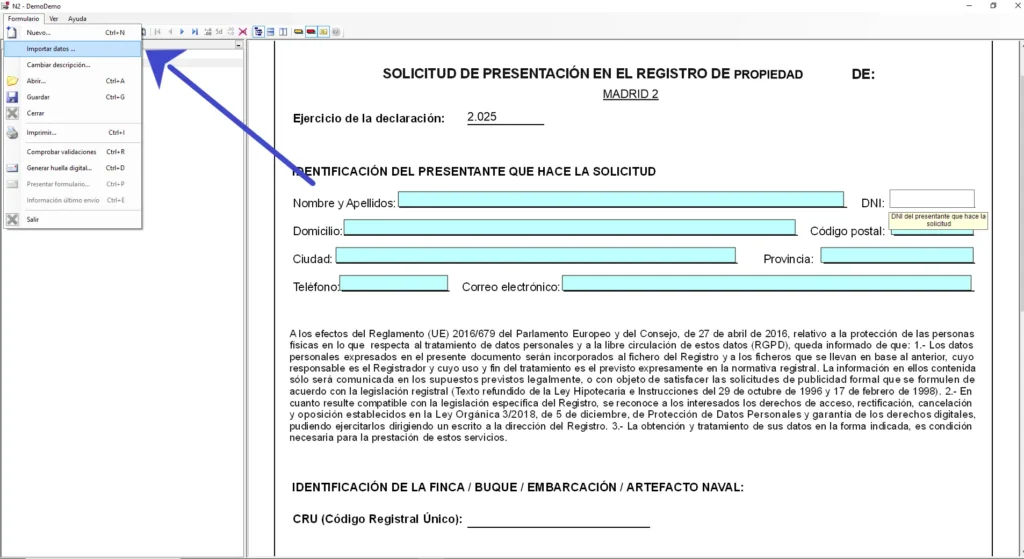
5️⃣ We will send the data collected from Traveler Registration, installing the N2 program, selecting new form and choosing the “Import Data” option exported from registroparteviajeros.com. Selecting them from the folder where we have downloaded them.
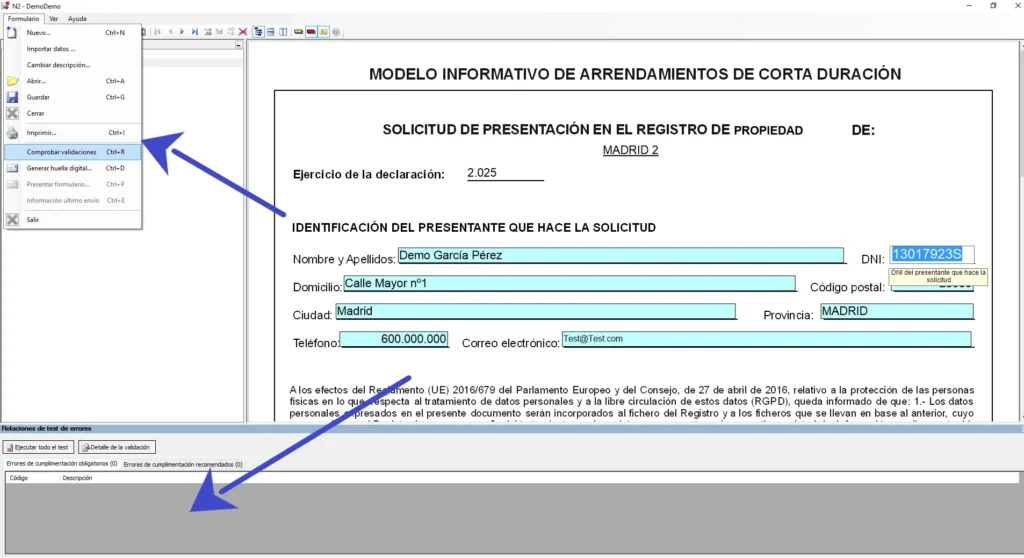
6️⃣ From here both methods are carried out in a similar way. Once all the data is filled in, we will have to validate that we have done it correctly and generate the digital fingerprint by clicking on the drop-down menu in the upper left corner of the screen. If there are errors in the validation, they will appear at the bottom of the program and we must fix them before being able to generate the digital fingerprint and submit the form:
7️⃣ The Submission of the form can be in person or telematically and within this, directly or by entering the electronic headquarters of the College of Property Registrars, as an example we will take the telematic submission directly:
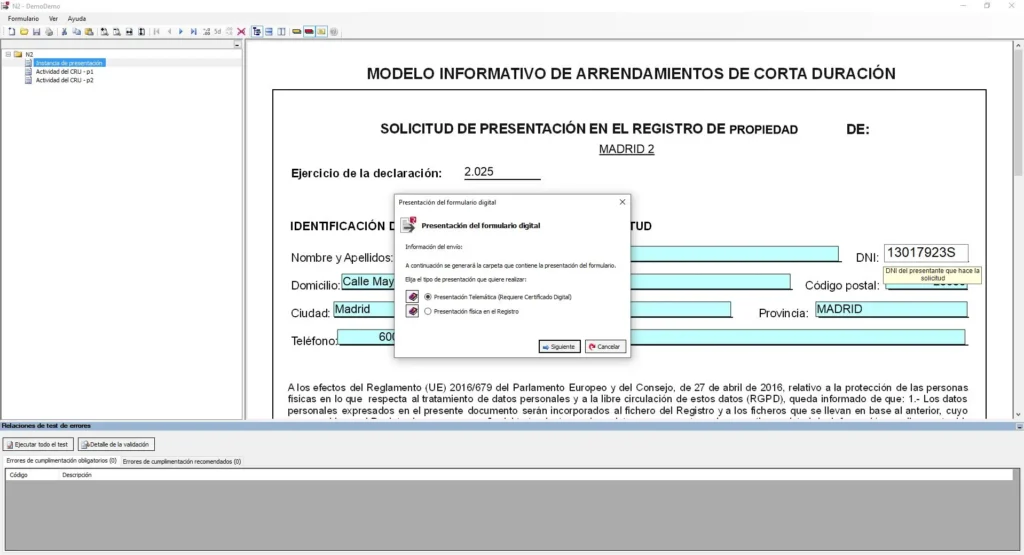
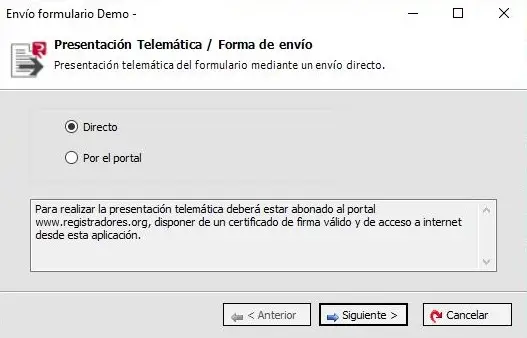
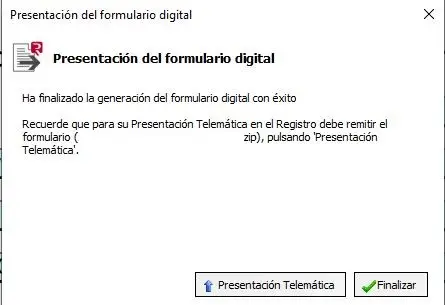
8️⃣ It will make us choose where we want to save the files to then submit them and it will be saved in the chosen location as a .zip file, which will be the one we finally submit and a pdf file in which we will have a copy of the submission form.
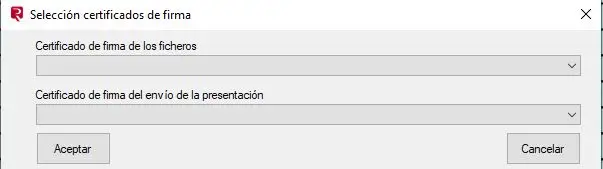
9️⃣ Finally, we will indicate whether we want to submit the form for the first time or rectify the defects, and we will select the appropriate digital certificates to sign:
🔟 Finally, we must enter the data before the end of February each year, an essential procedure if we want to avoid fines or even, in the worst case, the closure of our establishment.
🍎How to register for Mac users
Mac users and other devices incompatible with the N2 program of the Property Registry now have the alternative of carrying it out through the N2 Multi Web Application within the Property Registry website.
For a step-by-step guide on how to use it, please refer to our guide on the app at the following link.
Correct the errors in data submission in the N2 program
If we detect that we have made a mistake the N2 program gives us the opportunity to correct it, we should fill in the data in the program and validate it again by only changing the incorrect cells or adding the data we may have forgotten. Then, we should return to the telematic submission option as shown in the image:
We will select the option for direct shipping:
We will select the rectification option of a previous form
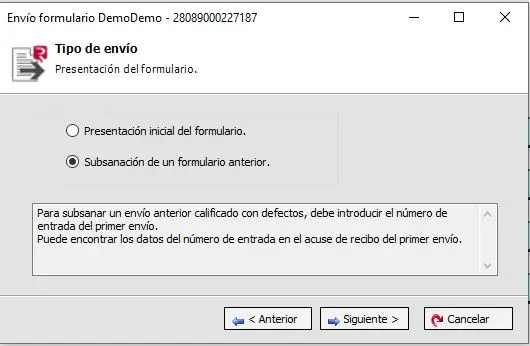
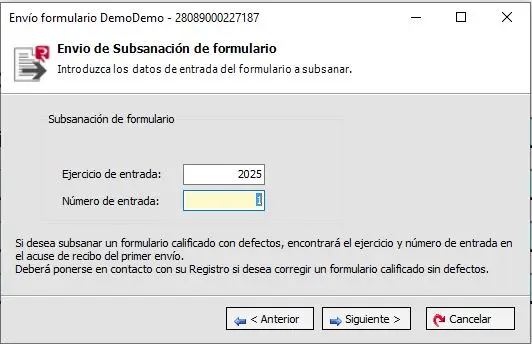
We will select the year corresponding to the file to be corrected and enter it where it says “exercise” and fill in the shipment number that is in the acknowledgment of receipt we downloaded in PDF format when we submitted the Rental Registry. A new reference code for the correction will automatically appear:
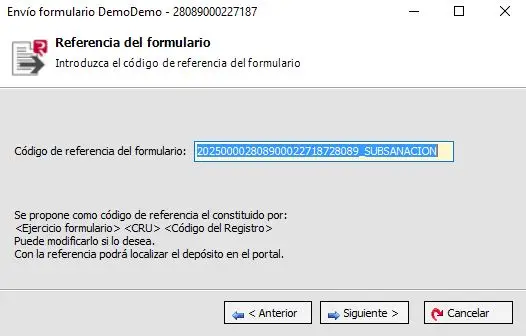
Finally, we will sign with a digital certificate and complete the submission of the correction.
❓Frequently Asked Questions
-What is the price of this procedure at the College of Property Registrars?
The fee for the procedure will be €27.05 for each deposit submission plus taxes and withholdings.
-Where can I read the annual registry regulations? And the SESHOSPEDAJES ones?
The regulations for the Annual Registry and the NRUA are found here. Whereas the regulations for periodic accommodation records can be found in this Royal Decree.
-In my autonomous community, rentals of more than 10 days are not considered vacation rentals. Do I have to include them in the form?
Yes, this form does not specify any date limits for the accommodations, all must be registered.
-My property is listed on Booking.com, VRBO, or any other OTA, do I need to complete the Annual Registration?
Yes, all short-term accommodations must be registered, both those made through professional platforms and those made non-professionally through platforms.
-I can’t submit it electronically. Can I submit it on paper?
Yes, at the Property Registry office where the house or tourist accommodation is registered. You can find your property registry in this directory.
–In which portal do I have to submit it electronically?
Through the program enabled by the Colegio de Registradores de la Propiedad “N2” directly or at the headquarters of the Colegio de Registradores de la Propiedad de España or through the One-Stop Window of the Ministry of Housing and Social Affairs.
– How do I download the N2 program?
Through the page enabled by the Property Registry at this link.
Is the N2 program available for Windows and Mac?
No, it is only available for Windows, we will not be able to install and use the program for Mac until February 16. However, this version will have certain limitations compared to the Windows version, as it will only be used to generate the zip file with the XBRL in the appropriate format to make the submission through the headquarters, and it will have a maximum limit of 325 activity rows per submission instance.
-I have not rented out my tourist home during the past year. Do I have to submit the registration form?
Yes, you must fill in all the data by checking the box in the last column of the form, and if you do not intend to rent it in the future, you must submit a declaration of cessation of activity to the corresponding regional or local authority.
-What is this Annual Register going to be used for?
This report will be used for statistical purposes and for the Administrations to have precise data on what services the homes in the area need, as well as for the fight against crime and terrorism. It will also be used to formulate the housing policy of the Administrations.
-Will this form be sent to the Treasury or to the Tax Agency?
No, it will only be used for statistical purposes and to inform the administrations.


