Introduction
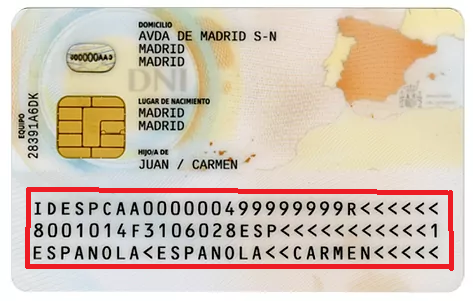
Surely you have noticed those strange lines full of symbols <<<< and numbers that appear at the bottom of passports or on the back of the DNI. That is the MRZ Code (Machine Readable Zone).
Although it looks like a meaningless series of characters, that code is the key to digitizing documents in seconds. Thanks to this technology, applications like Registro Parte Viajeros can scan a document with the mobile camera and instantly fill out the guest form, eliminating manual errors at the time of reception.
What is the MRZ Code?
The acronym MRZ comes from English Machine Readable Zone. It is a specific area within official identity documents (DNI, passport, visas) intended to be automatically read by machines and mobile devices.
Unlike the rest of the document, which is designed for us to read with our eyes, the MRZ code is designed for software to understand it unambiguously, ensuring that the captured data is 100% accurate.
Where is the MRZ Code located?
Depending on the document, its location varies:
- In the Passport: It is located at the bottom of the biographical data page. They are two long lines filled with characters.
- In the Spanish DNI (and most European documents): It is located on the back of the document. They are three lines occupying the bottom part.
- On the NIE / TIE: It is also usually located on the back or on the lower front, depending on the card model.
What information does this code hide?
The MRZ code condenses the most important information of the holder to validate their identity. Although you see many filler symbols <, encoded inside are:
- Document type (P for passport, I or ID for identity).
- Issuing country (ESP for Spain, FRA for France, etc.).
- Last Name and First Name of the holder.
- Document number (DNI or Passport Number).
- Nationality.
- Date of birth.
- Sex.
- Expiration date of the document.
- Control digits: Mathematical numbers that verify that the rest of the data have not been tampered with.
What it is for and why it is vital in Check-in
The main function of the MRZ code is speed and security.
In the past, registering a traveler meant that the receptionist or owner had to manually type in all the data. This was not only slow but also caused errors (number mix-ups, typos in foreign names, etc.).
By using the code MRZ, three immediate advantages are achieved:
- Instant reading: All data is captured in less than 1 second.
- Zero errors: The machine does not make mistakes when transcribing a complex last name or a date.
- Detection of fake documents: If the control digits of the MRZ do not match the printed data, the system detects the anomaly.
How the MRZ scan works in Traveler Registration Part
This is where technology works for you. The mobile application of Registro Parte Viajeros includes a native MRZ scanning function specifically designed for in-person check-in.
If you prefer to check in directly at the accommodation (or if the guest has not completed the online process), just open the app and point your device’s camera at the MRZ code of the ID or passport.
The system:
- Automatically reads the information.
- Processes data securely on the device itself.
- Fill in the necessary fields without having to write anything.
This functionality guarantees an accurate, fast, and secure registration, ideal for streamlining the check-in of guests who arrive in person at the front desk.
See how easy it is to check in with our app
Frequently Asked Questions about the MRZ Code
Do all documents have an MRZ code?
The vast majority of international travel documents (passports) and modern identification documents (European ID, TIE) are required to have it following the ICAO standard.
Is it safe to scan the MRZ code?
Yes, it is completely safe. The scan simply reads the information that is already visible on the document to streamline administrative procedures.
What happens if the MRZ code is worn out?
If the document is very damaged and the code is blurry, the camera might not detect it. In that exceptional case, the app allows you to enter the data manually.
Why are there so many symbols “<<<“?
Those symbols function as separators so that the reader knows where one piece of data ends and the next one begins, without using white spaces that could confuse the system.
Conclusion
The MRZ code is the bridge between paper and the digital world. Far from being meaningless lines, they are the tool that allows traveler registration to cease being a slow bureaucratic task and become an automatic process that takes seconds.
Use mobile tools prepared to read this code, such as the Registro Parte Viajeros app, it is the best way to professionalize the welcome to your guests and avoid administrative errors.